Guides · Claude
Stop running out of Claude.
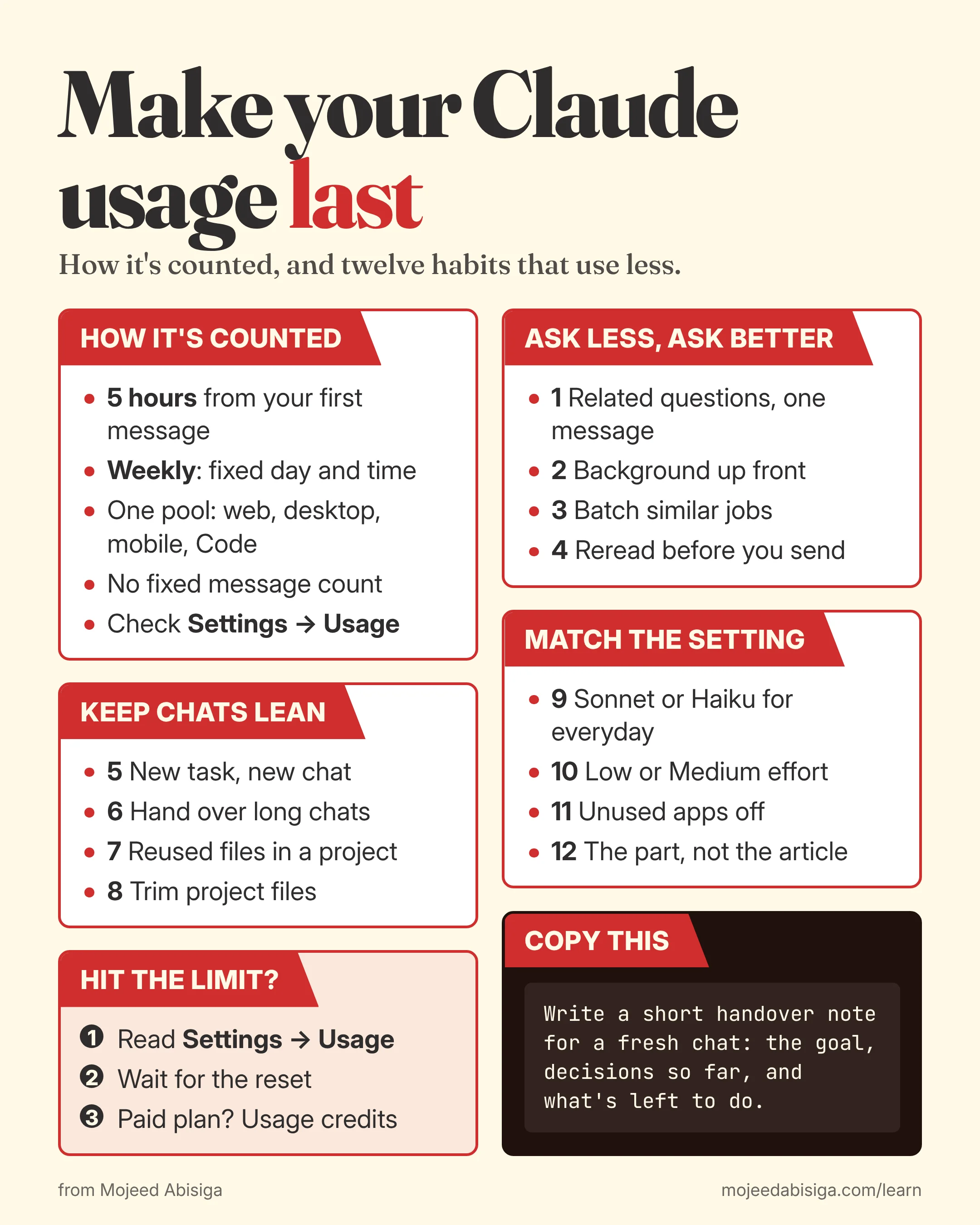
Hit the limit mid-task? How usage is counted, and twelve habits that make it last:

Contents
You're halfway through a real piece of work.
Then Claude tells you you've reached your limit.
The report isn't finished. The deadline hasn't moved.
Most people blame the plan. Often the cause is the way they're using Claude.
I teach people to use AI at work, and my mission is to make data and AI easy for everyone. So this guide sticks to what Anthropic's own help pages say, in plain words.
By the end of this guide you'll know:
- how your usage is actually counted
- where to see how much you have left
- what uses it up fastest
- twelve habits that use less, each one small
- what to do when you hit the limit anyway
You need: a Claude account, on any plan, and five minutes to look at your own settings.
Get the next one in your inbox
One practical guide at a time: the exact steps, the prompts to copy and the mistakes to skip.
Free. Delivered by Substack, one click to unsubscribe. Form not showing? Subscribe on Substack.
1. Know the two kinds of limit
Claude has two different limits. Mixing them up is where most confusion starts.
Usage limits are your budget over time. Anthropic's help centre calls it a "conversation budget": how much you can use Claude across all your chats before you wait for a reset.
Length limits are about one single chat. Each chat can only hold so much text at once. That space is called the context window.
They have different fixes. So it helps to know which one you've hit.
| Usage limit | Length limit | |
|---|---|---|
| What it measures | How much you use Claude over time, across all chats | How much fits in one chat |
| When it ends | When the five-hour session or the weekly limit resets | It doesn't: you move to a new chat |
| Does upgrading help? | Yes: the new plan's limits apply right away | No |
| Anthropic's fix | Wait for the reset, or use less | Start a new conversation, or use projects |
2. See how usage is counted
Here's how it works on most accounts, from Anthropic's own pages.
The five-hour session. Your session starts with your first message. It resets in full five hours later.
The weekly limit. Paid plans also have a weekly limit. It resets at a fixed day and time assigned to your account, whenever you start using Claude.
One pool. Claude on the web, on the desktop app, on your phone and in Claude Code all draw from the same allowance. Voice mode counts too.
No fixed number of messages. There's no message count to keep track of. On the Free plan, the number of messages you get varies with demand.
Weekly limits cover every model. Some plans also have a separate weekly limit for Fable models.
One more thing to know. Anthropic says it may adjust limits to manage capacity, so they can change.
Where to check
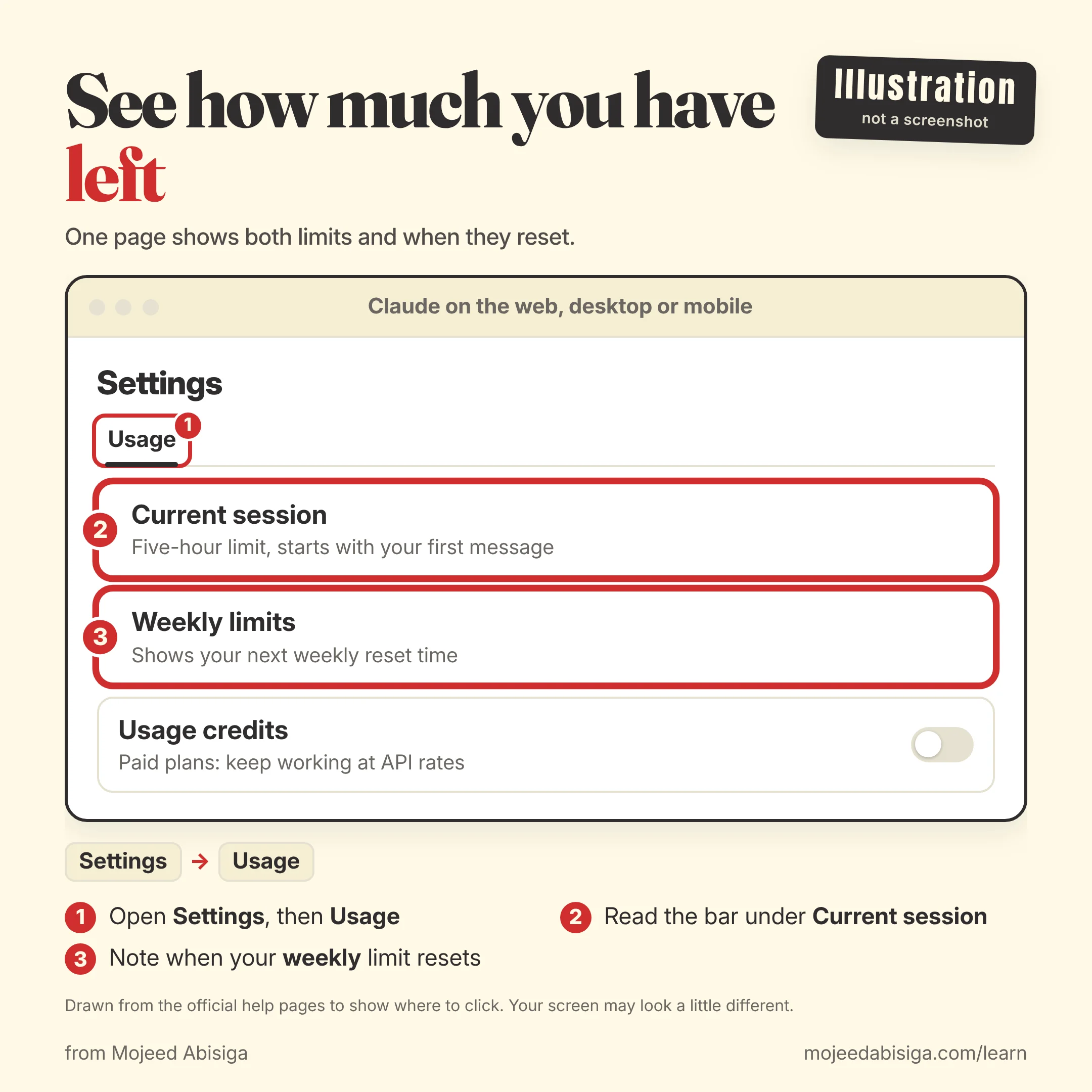
Open Settings, then Usage.
Under Current session, a bar shows how much of your five-hour allowance is left. The same page shows when your next weekly reset is.
3. Know what uses it fastest
Every message doesn't cost the same.
Anthropic lists the things that use your limit faster:
- long messages
- big attachments
- long conversations
- tools, such as Research and web search
- the model you choose
- a higher effort level
- artifacts (the documents, slides and other things Claude makes beside the chat)
- multi-step tasks
Two of these surprise people.
Long chats cost more as they grow. Anthropic's Claude Code guide explains why: every turn sends the whole conversation so far back to Claude, plus your new message. The conversation is the part that grows fastest. So the later messages in a long chat cost more than the early ones.
Links can be heavy. Web search and web fetch count toward your limits. A link to a long article pulls the entire article into the chat. Anthropic's example: summarising a 10,000-word article uses substantially more than a regular web search.
And one thing works in your favour. Files in a project are cached, so they count less against your limits when you reuse them. That cache expires after a while without use.
4. Ask less, ask better
The first four habits are about your messages. Anthropic's own usage tips come down to this: fewer, fuller messages.
Tip 1. Put related questions in one message
Five short messages cost more than one complete one, because each new message carries the chat so far with it.
So collect your questions first. Then send them together.
I'm preparing a 10-minute update for my team on our new expense policy.

Please:
1. Summarise the attached policy in five bullet points.
2. List the three changes most likely to confuse people.
3. Suggest one question I should be ready to answer.
Tip 2. Give the background up front
When Claude has to guess, you end up correcting it. Every correction is another message.
Say who it's for, what it's for and what good looks like, in the first message.
Anthropic's prompting guide has a simple test: would a colleague with no context understand your request? If they'd be confused, Claude will be too.
Tip 3. Batch similar jobs
Got six emails to draft, or ten product descriptions to tidy?
Ask for all of them in one message, not one per message.
Below are six customer emails, separated by lines of dashes.

For each one, write a short, polite reply in plain English.
Keep each reply under 80 words.
Number the replies to match the emails.
Tip 4. Read it once before you send
Ten seconds of checking saves a follow-up.
Is the file attached? Did you say how long the answer should be? Did you say the format: table, bullets, an email?
Anthropic's advice is to be specific about the format and constraints, and to ask for more than the minimum if you want it.
5. Keep your chats lean
The next four habits stop a chat from growing heavier than it needs to be.
Tip 5. New task, new chat
When you move to a different job, open a new chat.
The old chat's history doesn't help the new task. It just gets carried along and counted.
Tip 6. Hand over before a chat gets too long
When a long chat gets close to its length limit, Claude automatically summarises the earlier messages so it can keep going. That uses more of your usage limit.
If you're near your limit, Anthropic suggests starting a new conversation.
Before you do, ask for a handover note. Then paste it into the new chat.
Write a short handover note I can paste into a new chat.
Include:
- the goal of this work
- the decisions we've made so far
- the facts and figures we're relying on
- what's left to do, in order
Keep it under 200 words.
Tip 7. Keep reused files in a project
If you upload the same files again and again, put them in a project instead.
A project is a workspace with its own chats and its own knowledge: the files and instructions every chat in it can use. Projects are on every plan, and Free users can create up to five.
Project files are cached, so they cost less each time they're reused.
GuideBrief Claude like a new colleague.Short prompts get average answers. A two-minute brief gets the finished thing, first time:Tip 8. Trim the project
A project's files and instructions come along to every chat in it.
So Anthropic suggests keeping project instructions short and removing project files you no longer use.
Once a month, open your busiest project and delete what's out of date.
6. Match the setting to the job
The last four habits are about the settings you choose. Bigger isn't always better here.
Tip 9. Use Sonnet or Haiku for everyday work
For most tasks, Anthropic recommends the most efficient Haiku model or the most recent Sonnet model, because they cost fewer tokens than the Opus models.
Anthropic describes Sonnet 5.5 as strongest at well-scoped everyday tasks and polished documents, slides and spreadsheets. It describes Opus 5.5 as the model for complex work that needs careful judgment.
So save Opus for the hard thinking. Use Sonnet or Haiku for the rest.
Two notes:
- On the Free plan, Sonnet and Haiku are the models available.
- Fable models use your weekly limit faster than other Claude models. On plans that include Fable, that use comes out of the same weekly limit, not extra.
Tip 10. Lower the effort for routine jobs
Effort sets how much work Claude puts into a reply. Higher effort takes longer and uses more of your limits.
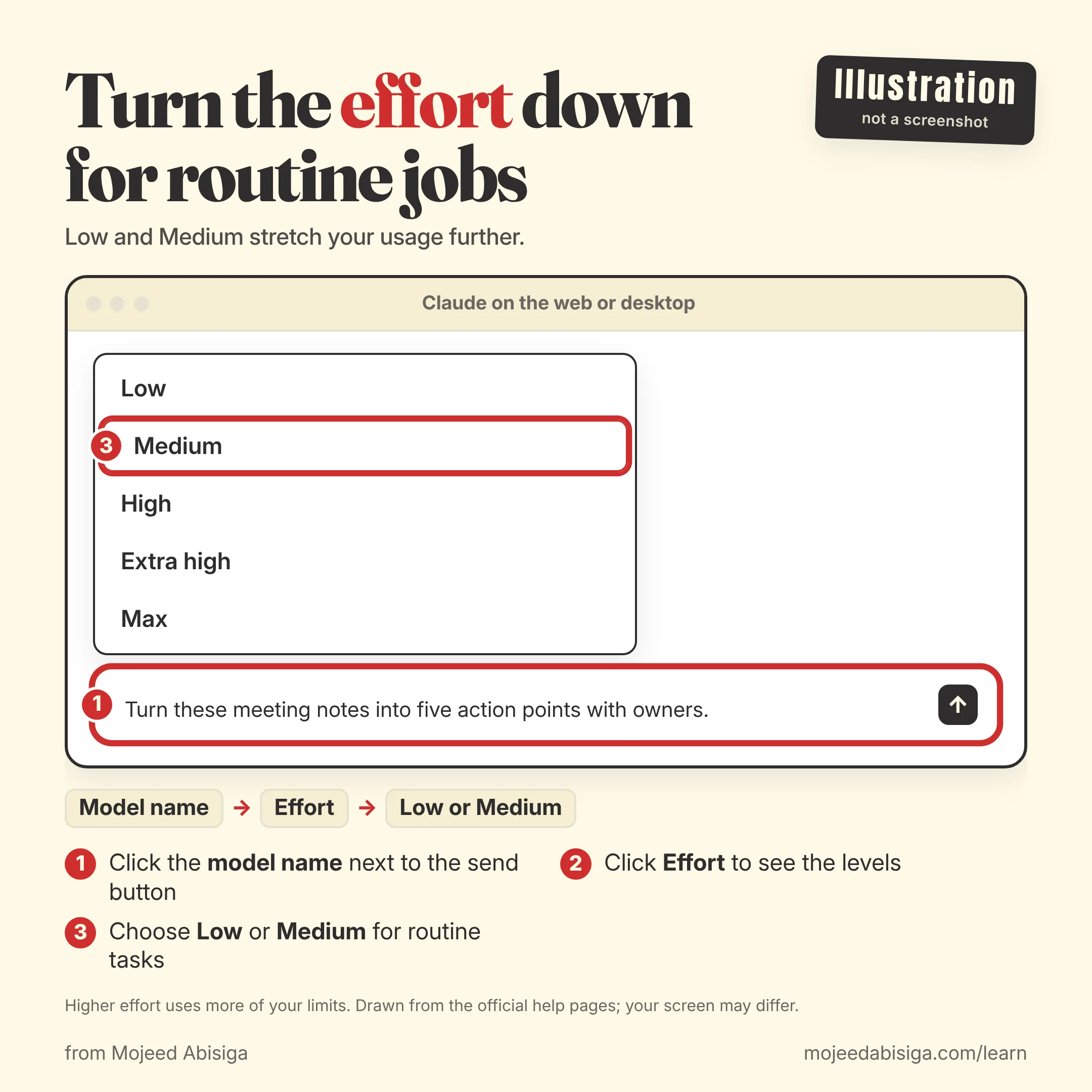
The levels are Low, Medium, High, Extra high and Max. In the Claude apps, the default is Medium.
To change it:
- Click the model name next to the send button.
- Click Effort.
- Choose a level.
Anthropic says Low and Medium suit routine tasks and stretch your usage further.
Tip 11. Switch off what the chat doesn't need
Tools and connectors (the apps you connect to Claude) are token-intensive.
Anthropic suggests two things:
- turn off connected apps a chat doesn't need
- ask Claude not to search the web when you don't need current information
Please answer from what you already know. Don't search the web for this one.

Explain the difference between a budget and a forecast, in plain English, in under 150 words.
Tip 12. Paste the part, not the whole article
A link pulls the whole page into your chat.
If you only need one section, copy that section and paste it in. You'll use less, and Claude focuses on what matters.
7. If you also use Claude Code
Claude Code shares the same limits as chat on paid plans. Anthropic's Claude Code guide adds a few habits of its own:
- type /clear when you start a new task
- type /compact when you're continuing a long one
- point Claude at file paths instead of pasting whole files
- trim logs to the 20 or 30 lines that matter
- keep CLAUDE.md under roughly 200 lines
The same guide says Opus costs several times more per turn than Sonnet, and calls Sonnet right for most coding work. One option it suggests is planning with Opus and building with Sonnet, which is built in as /model opusplan.
8. When you hit the limit anyway
It still happens. Here are your options, from free to paid.
Wait for the reset
Check Settings → Usage. The five-hour session resets in full five hours after it started. The weekly limit resets at its fixed day and time.
Use a limit reset, if you have one
A limit reset restores a five-hour, weekly or Fable limit. When Anthropic launched Opus 5.5, it gave subscribers one to use when they choose.
If you have one, it shows as Reset for free in Settings → Usage, on the web, desktop or mobile. It isn't available in Claude Code in the terminal.
Turn on usage credits (Pro, Max and Ultra)
Usage credits let you keep working after you hit your limits, at standard API rates. They're charged separately from your subscription and cover both chats and Claude Code.
To turn them on:
- Go to Settings → Usage.
- Click the toggle in the Usage credits section.
- Use Adjust limit to set a monthly spend limit.
- Click Buy usage credits.
When work switches to credits, the warning changes to Now using credits. You haven't been cut off.
Credits bought on or after December 7, 2026 generally expire 12 months after purchase, and purchases are non-refundable. So set a spend limit you're comfortable with.
Upgrade, if it keeps happening
If you upgrade after hitting a session or weekly limit, the new plan's limits apply right away. You can compare the plans on Claude's pricing page.
But try the twelve habits for a week first. Often they're enough.
9. One clear first message
Every habit above saves a little. A clear first message saves the most, because it avoids the back-and-forth.
Anthropic's prompting guide says to treat Claude like a brilliant new employee who doesn't know your norms yet. The more precisely you explain what you want, the better the result.
Three basics that cut follow-ups:
- Say the format. A table, five bullets, a 100-word email.
- Show one example. Anthropic's advice for app users is to start with one example and add more only if the result still doesn't match.
- Let Claude say "I don't know". Anthropic says giving that permission can drastically reduce false information, which means fewer rounds of checking and fixing.
I need [what you want], for [who it's for], so they can [what they'll do with it].

Context: [two or three lines of background].

Format: [table / bullets / email], about [length].

Here's one example of the style I like: [example].

If you're not sure about something, say "I don't know" rather than guessing.
Learn to brief Claude properly
Your first three
Don't try all twelve today. Start with three:
- Check Settings → Usage before your next long task.
- New task, new chat, with a handover note when a chat gets long.
- Put related questions in one message.
Then add one habit a week.
Before you finish
- I've opened Settings → Usage and know when my weekly limit resets
- I know the difference between a usage limit and a length limit
- My effort level matches the job in front of me
- Connected apps I don't need are switched off
- I've saved the handover prompt somewhere I can find it
Questions
Is there a set number of messages I can send?
No. Anthropic publishes no fixed message count. How fast you reach a limit depends on the model, how long your chats are and how big your files are.
Does Claude Code use the same allowance as chat?
Yes. On paid plans, Claude Code shares your plan's usage limits with chat.
My chat stopped, but Settings → Usage shows I have usage left. Why?
You've probably hit the length limit of that one chat. Start a new conversation, or keep the files you reuse in a project.
Does voice mode count?
Yes. Voice mode counts toward your usage limits.
For more, read Anthropic's own pages on how usage and length limits work and its usage limit best practices.
NewsletterClaude, past the basics.Eighteen small habits that save time, usage and mistakes: GuideClaude, from day one.Never opened it? Everything you need for your first week, in plain words:Get the next one in your inbox
One practical guide at a time: the exact steps, the prompts to copy and the mistakes to skip.
Free. Delivered by Substack, one click to unsubscribe. Form not showing? Subscribe on Substack.