Guides · Claude
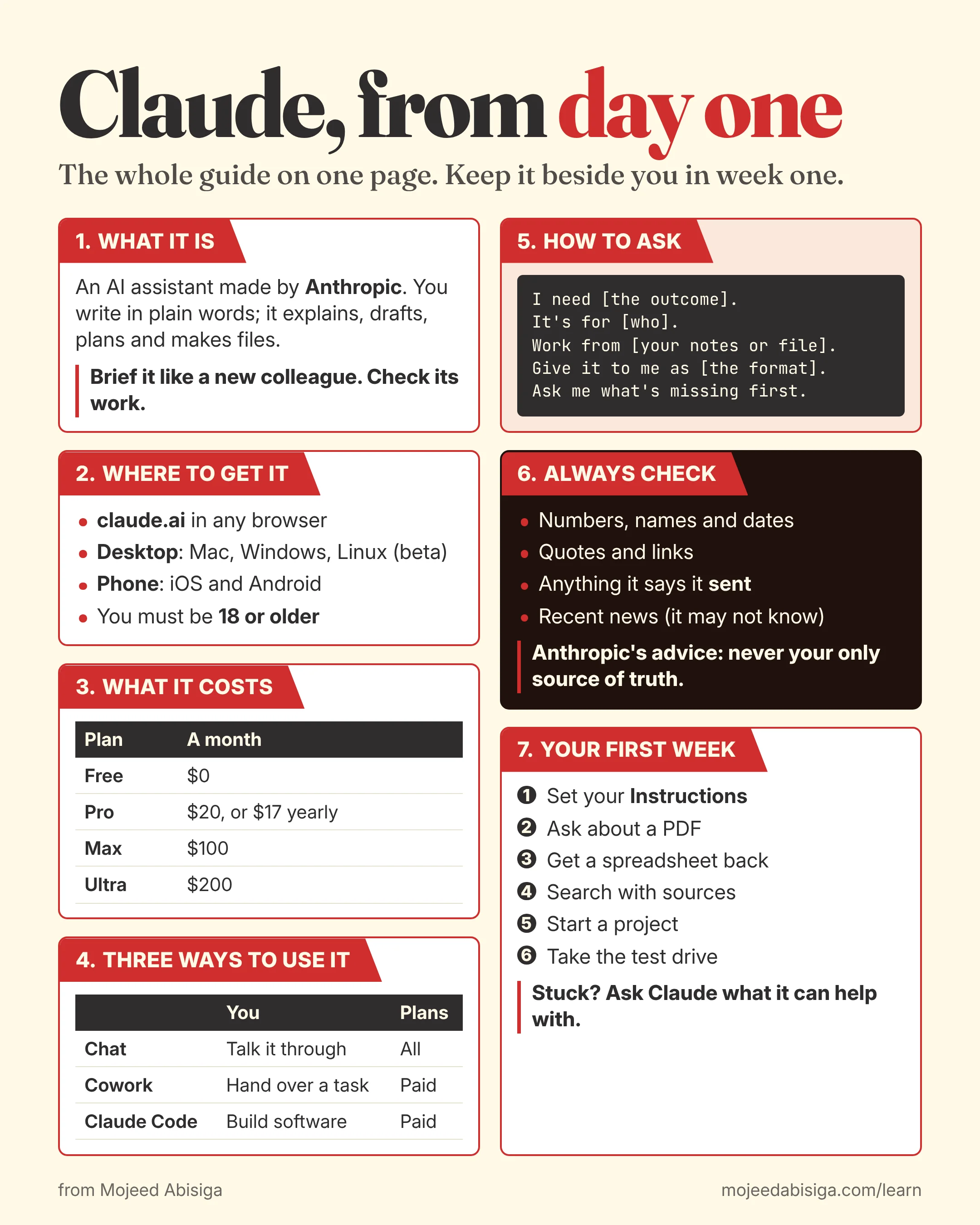
Claude, from day one.
Never opened it? Everything you need for your first week, in plain words:

Contents
Everyone seems to be talking about Claude.
You've never opened it.
Or you opened it once, typed a question, and weren't sure what to do next.
That's fine. This guide starts at zero.
I teach people to use AI at work, and my mission is to make data and AI easy for everyone. So: plain words, real steps, no jargon.
By the end of this guide you'll have:
- Claude on your phone and your computer, on the right plan
- the few settings that matter, set once
- a simple way to ask that gets good answers
- a clear sense of what to trust and what to check
- ten things to try this week, and one real task done
You need: a phone or a computer, and to be 18 or older.
Get the next one in your inbox
One practical guide at a time: the exact steps, the prompts to copy and the mistakes to skip.
Free. Delivered by Substack, one click to unsubscribe. Form not showing? Subscribe on Substack.
1. Meet your new assistant
Claude is an AI assistant made by a company called Anthropic.
Anthropic's help centre describes it as a large language model, trained to be helpful, honest and harmless, with a conversational tone.
In plain words: you write to it the way you'd write to a person, and it writes back.
It can explain, draft, rewrite, summarise, plan and analyse. It can read your files and make new ones: spreadsheets, documents, slides.
A quick question gets a quick answer. A bigger job gets worked through step by step.
Anthropic calls itself a public benefit corporation. Its stated mission is the responsible development of advanced AI for the long-term benefit of humanity.
2. Get Claude on your devices
Claude lives in three places, all on one account:
- In a browser: go to claude.ai.
- On your computer: Claude Desktop, for Mac, Windows and Linux (Linux is in beta). Download it from claude.com/download.
- On your phone: Claude for iPhone and iPad (listed as "Claude by Anthropic" in the App Store) and Claude for Android.
Your conversations, projects, memory and preferences sync between them.
Start on your laptop. Carry on from your phone.
What your device needs:
| Device | Needs |
|---|---|
| Mac | macOS 13 (Ventura) or newer |
| Windows | Windows 10 or newer |
| iPhone and iPad | iOS or iPadOS 18.0 or newer |
| Android | Android 8.0 (Oreo) or newer |
Two rules before you sign up:
- You must be 18 or older.
- You must be in a supported location. Nigeria, the United Kingdom and the United States are on Anthropic's list, along with many others. Check yours here.
3. Pick a plan
Start on Free. It costs nothing and covers a lot.
Here's the full list. These are the US prices: Anthropic shows local currency where it supports it. Prices exclude tax and can change.
| Plan | Price | What you get |
|---|---|---|
| Free | $0 | Chat on web, desktop and phone, web search, file creation, memory, connectors and artifacts |
| Pro | $20 a month, or $17 a month billed yearly ($200 up front) | More usage than Free, plus Claude Code, Research, Cowork, more models, and Claude in Chrome and Microsoft 365 |
| Max | $100 a month | 5x Pro's usage, early access to features, priority at busy times |
| Ultra | $200 a month | 10x Pro's weekly usage, and no 5-hour limit for verified accounts |
| Team | $20 a seat a month billed yearly, or $25 monthly (Premium seats: $100 or $125) | Teams of 2 to 150, with admin controls |
| Enterprise | $20 a seat a month billed yearly, plus usage at API rates | Larger organisations, from 20 seats |
Which one is right for you?
- Your first week: Free.
- You keep hitting the limit, or you want Cowork or Claude Code: Pro.
- Pro's limits still stop you most days: look at Max or Ultra.
How the limits work. There's no fixed number of messages. Instead:
- Your limit runs on a five-hour window. It starts with your first message and resets in full five hours later.
- Paid plans add a weekly limit, which resets at a fixed day and time set for your account.
- On Free, how much you get also varies with demand.
- The web, desktop and phone apps, and Claude Code, all draw from the same pool.
- You can see what's left under Current session in Settings → Usage.
Long chats, big files, web search and Research use it up faster.
How Claude's usage limits work
4. Find your way around
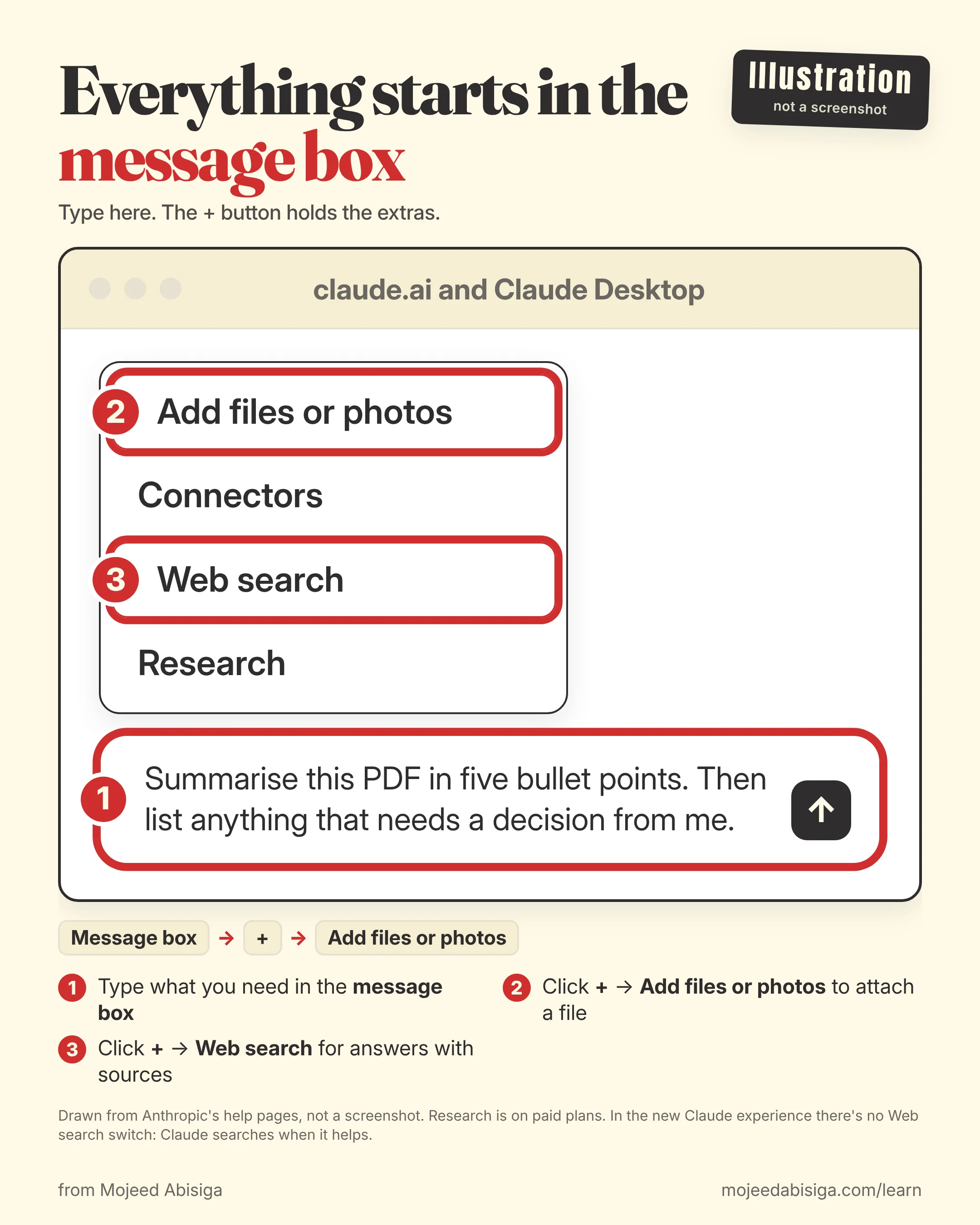
Everything starts in the message box. Type what you need, then click send.
The + button, in the lower left of the message box, holds the extras:
- Add files or photos: attach a document or an image. You can also drag files into the chat.
- Web search: let Claude look things up, with sources you can click.
- Research (paid plans): many searches that build on each other, for bigger questions.
- Connectors: link the apps you use, so Claude can work with them.
You can also type / in the message box to see more options and commands.
The model name, next to the send button, shows which Claude you're talking to. On your phone, it's at the top of the screen.
Click it to switch, or click More models. The change applies from Claude's next answer.
Which model? On Free, you get Sonnet and Haiku.
On paid plans, Anthropic's advice is simple: if you're not sure, start with Opus 5.5 (more on Opus 5.5).
Sonnet 5.5 balances speed and intelligence. Haiku 5.5 is the fastest.
The ghost icon, top right when you start a new chat outside a project, opens an incognito chat. It isn't saved to your history or memory, and it isn't used for training. Anthropic still keeps it for 30 days by default.
Your initials, bottom left, open Settings.
5. Learn seven words, skip the rest
You'll hear a lot of jargon. You need very little of it.
Learn these now:
| Word | What it means |
|---|---|
| Prompt | Whatever you type (or say) to Claude. |
| Model | The version of Claude you're talking to, such as Opus, Sonnet or Haiku. |
| Usage limit | How much you can use Claude in a five-hour window (and, on paid plans, in a week). |
| Project | A workspace with its own chats, files and instructions. Free includes up to five. |
| Artifact | Something Claude makes for you to use or share, like a document, a deck or a small tool. It opens beside the chat. |
| Memory | What Claude remembers about you between chats. You can see and edit it. |
| Hallucination | A confident answer that's wrong. |
Skip these for now:
- Tokens and context windows: how much text fits in one conversation. Claude tells you if a message is too long.
- Effort and thinking: settings in the model menu. The default effort in the apps is Medium, and that's fine to start.
- The API and the Claude Console: for developers building their own apps. Pro doesn't include it; it's billed separately.
- Fable and Mythos: models for demanding reasoning and long, complex work. Fable isn't on Free, and Mythos is for verified organisations.
- Benchmarks: the scores companies publish about their own models.
- Skills and plugins: ways to teach Claude whole jobs and bundle tools together. Worth it once the basics feel easy.
- Claude Code: unless you write software.
6. Set up four things, once
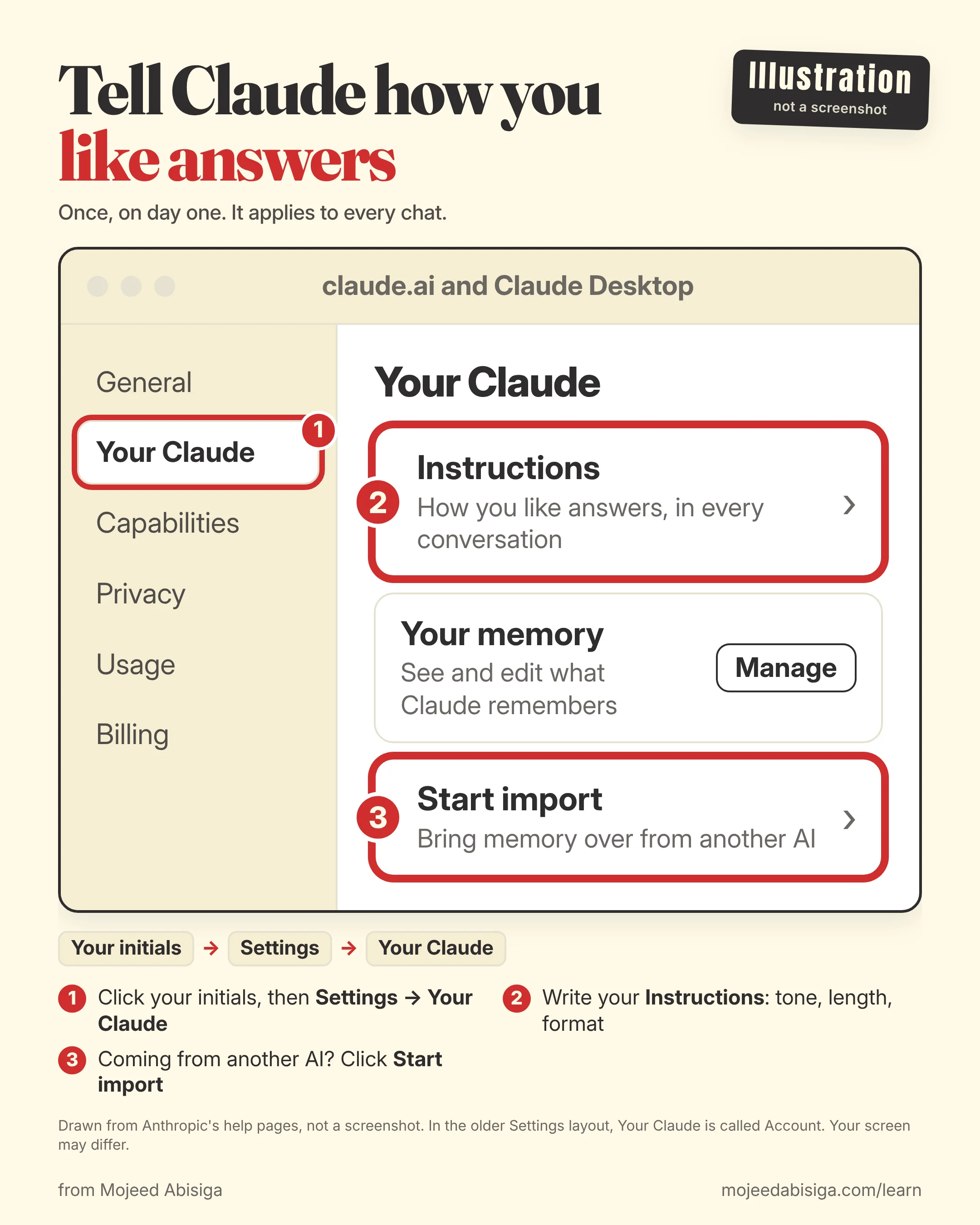
Do this on day one. Click your initials (bottom left), then Settings.
Your Claude → Instructions
Tell Claude how you like answers. Your Instructions apply to every conversation.
Paste this in and make it yours:
I work as [your job] in [your country]. Write in plain English, with [British or American] spelling. Keep answers short unless I ask for more. Use numbered steps for instructions. If my request is unclear, ask me one question before you start. If you're not sure about a fact, say so.Your Claude → Your memory
Memory is on by default on Free, Pro, Max and Ultra.
Claude saves what it learns about you as topics while you chat. You can also tell it to "remember this".
To see or edit what it remembers, select Manage next to Your memory. Each project keeps its own memory.
Privacy
Whether your chats are used to train Claude is a switch in Settings → Privacy.
On Free, Pro, Max and Ultra, you can opt out. Set it the way you want.
On Team and Enterprise, your content isn't used for training by default.
Usage
Settings → Usage shows how much of your limit is left right now, under Current session.
Check it after your first big task. You'll quickly get a feel for what uses a lot.
7. Three ways to work with Claude
When people say "Claude", they might mean one of three things.
Chat: talk it through
A conversation. You ask, Claude answers, and you go back and forth.
It's on every plan, including Free, on the web, the desktop app and your phone.
Use it for questions, drafts, explanations, summaries and files.
Cowork: hand over a task
You describe the result you want.
Claude works through the steps on its own: it searches the web, reads your files, runs code and puts it all together as finished files.
It brings Claude Code's way of working to everyday knowledge work, with no command line needed.
It runs in the cloud, so the work carries on if you close your laptop.
It's on paid plans only.
Use it for research write-ups, reports, spreadsheets and presentations built from your files.
Claude Code: build software
A tool for people who write code.
It reads a codebase, edits files, runs commands and works with developer tools. You'll find it in the terminal, in a code editor, in the desktop app and in the browser.
It's on all paid plans and shares your plan's usage with chat.
Don't write code? Skip it for now.
| Chat | Cowork | Claude Code | |
|---|---|---|---|
| You | Talk it through | Hand over a task | Build software |
| Plans | All, including Free | Paid | Paid |
| A good first try | A question or a draft | A report from your files | A small change to your code |
Chat or Cowork: which do you have? Look at your message box.
- It shows Chat and Cowork: select Cowork, bottom left of the message box, to hand over a task. Select Chat to go back to a normal conversation.
- It shows neither: you have the new Claude experience. Chat and Cowork are one conversation, with no mode to choose. Just describe what you need. It's rolling out to Pro, Max and Ultra, and once your account moves, it can't switch back.
Two more you'll hear about, both on paid plans:
- Claude in Chrome: a browser extension that lets Claude read, click and move around websites.
- Claude for Microsoft 365: Claude inside Excel, PowerPoint, Word and Outlook.
8. Talk to it like a colleague
Anthropic's own advice: talk to Claude the way you'd talk to a coworker or a friend. Naturally.
You don't need magic words. You need context.
When you ask for something real, give it three things:
- The outcome: what you want to end up with. "A one-page summary." "A table with one row per supplier."
- The format: how you want it. A Word document, a slide deck, a message you can paste.
- The inputs: what to work from. Paste the text, attach the file, or say which app.
See the difference:
Write an email about the meeting.Write a short, friendly email to my team about Thursday's planning meeting.
Outcome: everyone knows the three decisions and who does what by Friday.
Format: under 150 words, one opening line, then bullet points.
Inputs: my notes are below.
[paste your notes]Then keep going. The first answer is a draft.
Anthropic's tips for beginners: start simple, be specific, and refine with follow-up questions.
Follow-ups that work:
- "Shorter, and warmer."
- "Turn that into a table."
- "What's missing?"
- "Give me three other ways to open it."
Not sure what to ask? Ask Claude what it can help with.
Or hand the questions over:
Before you start, ask me the questions you need answered to do this well. One at a time.9. Coming from ChatGPT?
It's the first question most people ask.
Here's a fair answer, built only from what each company publishes about its own product.
| Claude | ChatGPT | |
|---|---|---|
| Free plan | Yes, with limited usage every 5 hours and every week | Yes, advertised as unlimited text chats with GPT-6, within abuse guardrails |
| First paid plan | Pro: $20 a month, or $17 a month paid yearly | Plus: $20 a month |
| Bigger plans | Max at $100 and Ultra at $200 a month | Pro 100, Pro 200 and Pro 500, at $100, $200 and $500 a month |
| Ads | None: Anthropic has committed to keeping Claude ad-free | May appear on the Free and Go plans |
| Making pictures | No photos or illustrations; it makes diagrams, charts and visuals | Image generation on every plan (limited on Free) |
| Text it takes in at once | Up to 1M tokens in chat on paid plans, with the newest models | 27K to 128K tokens (GPT Instant) or 256K to 400K (GPT Reasoning), by plan |
For scale, Anthropic says 200K tokens is about 500 pages of text.
What that means for you:
- You want pictures made? ChatGPT makes images. Claude doesn't.
- You work with long documents? Claude's paid plans take in more text at once.
- You'd rather not see ads? Anthropic has promised no ads and no sponsored links in Claude. (Its announcement, and OpenAI's page on ads.)
- Price? The first paid step costs the same: $20 a month.
10. Where it helps, and where it slips
Where it helps most:
- Explaining anything at your level, and answering the follow-ups.
- Writing and rewriting: emails, posts, reports, in the tone you ask for.
- Reading your files: PDFs, Word documents, spreadsheets, CSV files and images. Up to 20 files per chat, and 500MB per file.
- Making files: Excel, Word, PowerPoint and PDF.
- Artifacts: documents, decks, dashboards and small tools that open beside the chat, ready to edit and share.
- Searching the web, with sources you can check.
- Languages: it's trained extensively in English and performs well in many other common languages.
Where it slips:
- It can be confidently wrong. Anthropic calls this hallucination, and says not to treat Claude as your only source of truth.
- It can claim things it didn't do, like sending an email. It can only use tools that are actually connected.
- It doesn't make photos or illustrations. It draws diagrams, charts and visuals from code, and it can read images you upload.
- It may not know recent events. The newest models' training data runs to June 2026. Web search fills the gap.
- Long PDFs: over 100 pages, it reads the text only, not the charts and images.
- It has limits. A heavy day can use up your allowance.
Make checking a habit:
Go back through your answer. List every fact, number and name you used, where each one came from, and how sure you are. Flag anything I should check myself.The beginner mistakes:
- One-line prompts. Add the outcome, the format and the inputs.
- One endless chat for everything. Start a new chat for each new topic.
- Trusting every number. Check anything that matters.
- Asking for photos. Claude doesn't make photos or illustrations.
- Believing "sent" or "saved". If it says it did something outside the chat, check.
- Paying on day one. Free is enough to learn the basics.
11. Try ten things this week
One at a time. Each one shows you a different side of Claude, and the prompts are ready to copy.
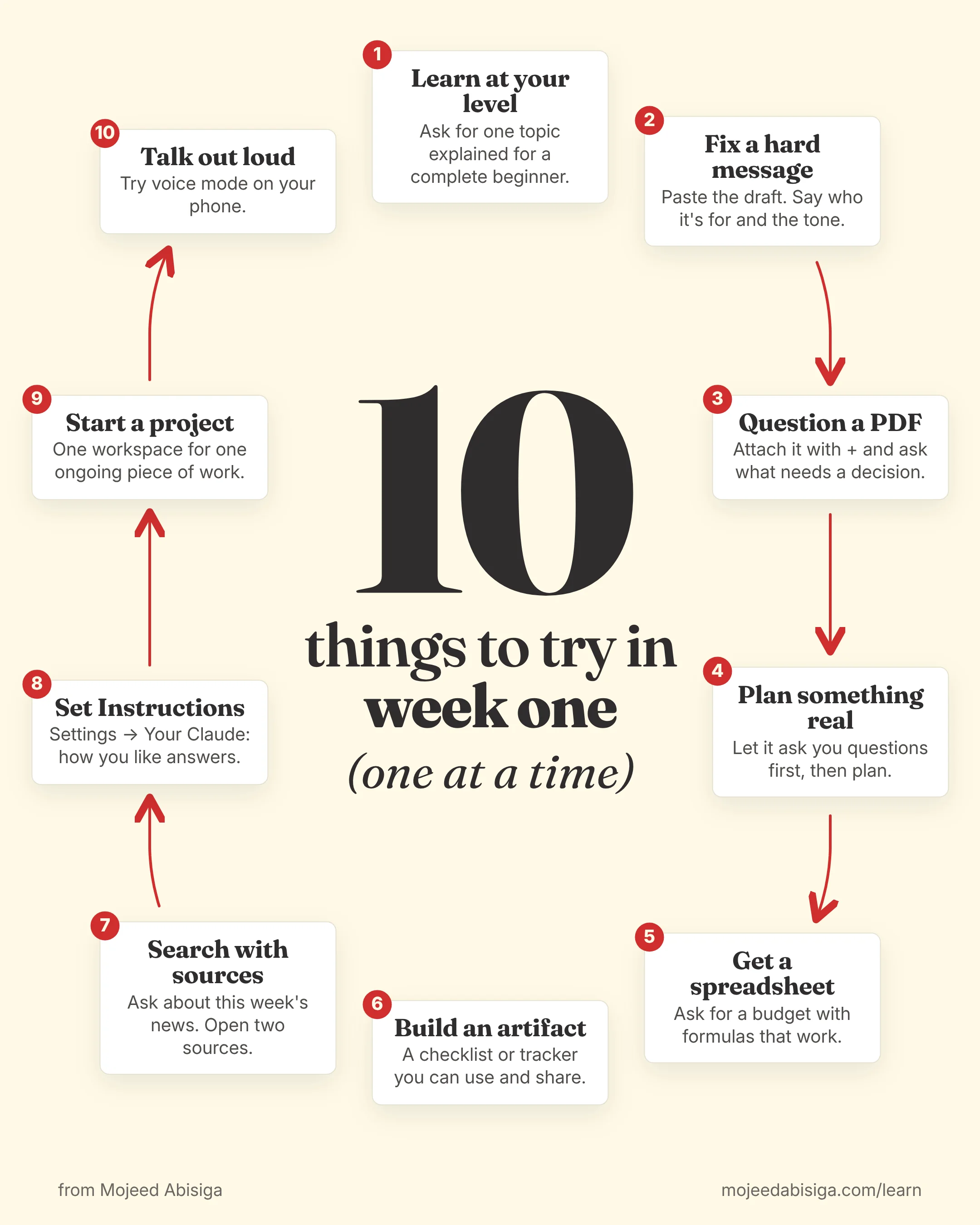
1. Learn something at your level
Explain how [a topic you've always half-understood] works. I'm a complete beginner. Use one everyday comparison and one short example, then ask me one question to check I've understood.2. Fix a message you've been putting off
Here's a message I need to send to [who]. Make it clear, polite and short. Keep my meaning. Give me two versions: one warmer, one more formal.

[paste your draft]
3. Ask questions about a document
Click + → Add files or photos and attach a PDF. Then:
Summarise this document in five bullet points. Then list anything that needs a decision or an action from me, and where in the document it is.4. Plan something real
Help me plan [a trip, an event or a project]. Ask me up to five questions first. Then give me a simple plan with dates and a checklist.5. Get a spreadsheet back
Make me a monthly budget as an Excel file. Columns for income, fixed costs, spending and savings, with formulas so the totals update when I change a number.6. Build an artifact
Ask for something small you'd actually use: "Make me a simple checklist for my weekly shopping that I can tick off."
It opens beside the chat. You can edit it and share it.
7. Search the web, then check the sources
Click + → Web search (in the new experience, just ask). Ask about something current in your field, then open two of the sources it cites.
8. Set your Instructions
Settings → Your Claude → Instructions. Start from the Instructions prompt in section 6 above.
9. Start a project
Go to claude.ai/projects and click + New Project. Add files with +, and tell Claude how to work there with Set project instructions.
Use it for one ongoing piece of work: a course, a client, a job search.
10. Talk instead of typing
Open the phone app and try voice mode. Talk through a decision you're stuck on.
12. Do one real task in ten minutes
Now put it all together on one real task from your week.
- Open a new chat on claude.ai or in the app.
- Paste the prompt below, filling in the brackets.
- Answer its questions.
- Fix one thing with a follow-up: "Shorter", "More formal", "Add a timeline".
- Ask for a file: "Now make this a Word document." Or a spreadsheet, or slides.
- Ask what to check: "What in this should I double-check before I use it?"
- Open Settings → Usage to see how much of your session that used.
I need [the thing you want, for example a one-page plan for next month]. It's for [who will read it]. Here's the background: [two or three lines]. Give it to me as [a table, a short document or bullet points]. Before you start, ask me up to three questions.How you know it worked: you have a file you'd actually use, and a short list of things to verify before you do.
Before you finish
- Claude is on my computer and my phone
- I know which plan I'm on, and when I'd move up
- My Instructions are set
- I've chosen my setting in Settings → Privacy
- I know where Settings → Usage is
- I've tried at least three of the ten
- I've done the ten-minute test drive
Questions
Does Claude cost anything?
Yes. The Free plan costs $0. It includes chat, web search, file creation, memory and artifacts, with limited usage every five hours and every week.
Will my chats be used to train Claude?
On Free, Pro, Max and Ultra, you can opt out in Settings → Privacy.
On Team and Enterprise, content isn't used for training by default. Incognito chats aren't used for training either.
Why did Claude stop answering?
You've most likely reached your usage limit. Claude tells you when you do.
Settings → Usage shows where you stand. The five-hour window resets in full five hours after your first message.
Does Claude work in my language?
It's trained extensively in English and performs well in many other common languages.
Can I bring my ChatGPT history?
Your chats, no. Its memory of you, yes: Settings → Your Claude → Start import.
What to do after week one
You have the basics. Build on them one step at a time.
Hand over whole tasks. Cowork does the steps for you, from start to finished file.
GuideCowork, from zero.You don't code? Good. Here's how to hand Claude real work, step by step:Build the daily habits that make Claude more useful every week.
NewsletterClaude, past the basics.Eighteen small habits that save time, usage and mistakes:Teach it the jobs you repeat, once the basics feel easy.
GuideClaude skills, from zero.For anyone who pastes the same instructions into Claude every day: install your first skill safely and use it today.Take Anthropic's own course. Claude 101 in Claude Academy has 13 lessons and 1 quiz, takes about 2.5 hours and ends with a completion badge.
Open Claude today and give it one real job. That's day one done.
Mojeed