Newsletter · claude
One good prompt.
Getting bland, generic answers? Five rules and one template that fix them:

You ask Claude for something.
It answers in seconds. Neat, polite, well organised.
And completely generic.
It could have been written for anyone.
Most of the time, the cause is the prompt. And the prompt is the part you control.
The good news: the fix is small, and Anthropic has written it down.
I teach people to use AI at work, and this is the lesson that pays off fastest. So I've boiled Anthropic's own prompting guidance down to what you need in a normal working day.
What's inside:
- Why answers come back generic
- Five rules that matter
- One template you can reuse for almost anything
- Ready-made versions for four everyday jobs
- The mistakes to stop making
- Where to save your rules so you never type them again
Get the next one in your inbox
One practical guide at a time: the exact steps, the prompts to copy and the mistakes to skip.
Free. Delivered by Substack, one click to unsubscribe. Form not showing? Subscribe on Substack.
Why answers come back generic
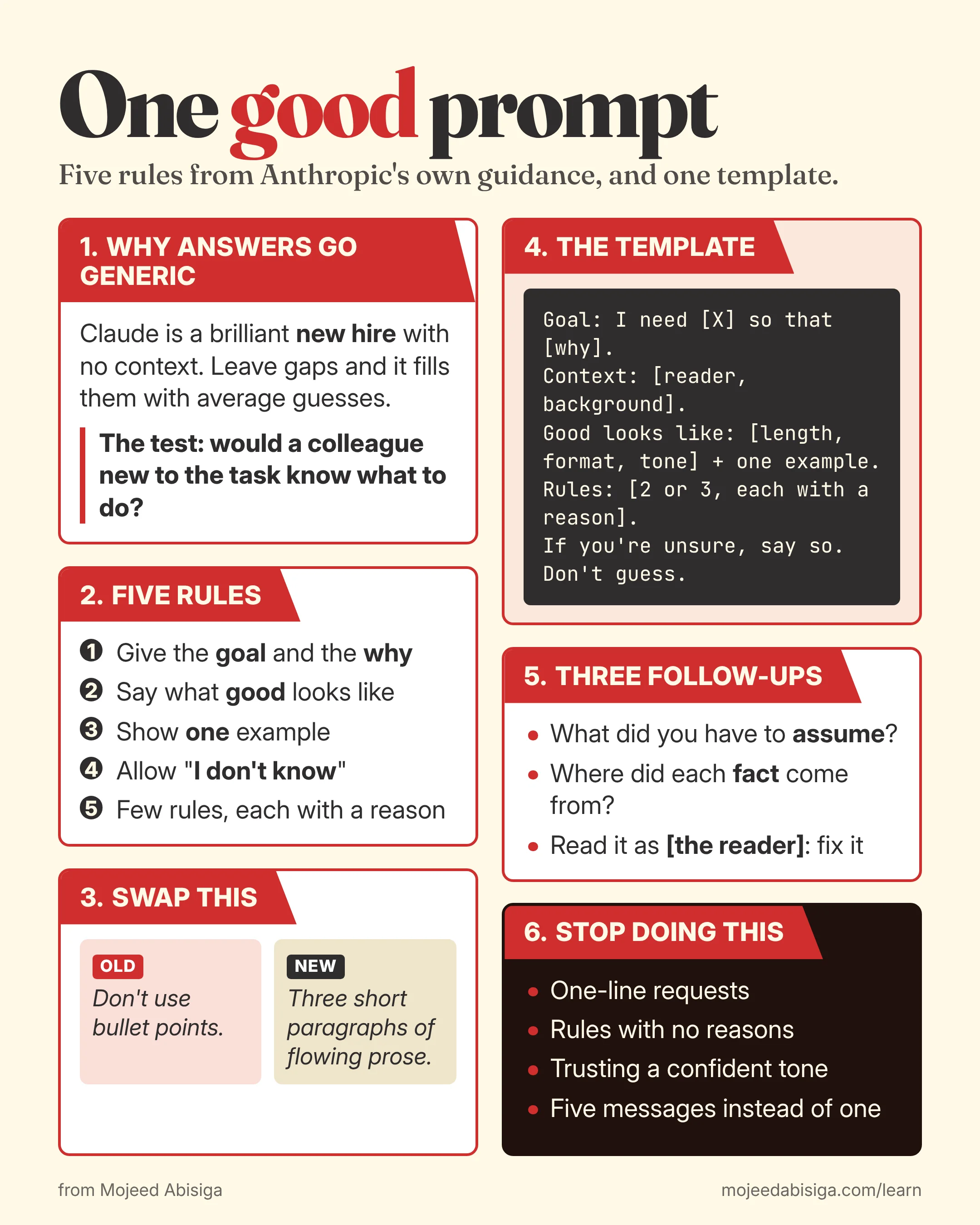
Picture a brilliant new hire on their first morning.
Sharp. Fast. Keen to help.
But they don't know your team, your customers, your standards or why the task matters.
Hand them a one-line request and they'll do the safest, most average version of it.
That's exactly how Anthropic tells you to think about Claude. Its prompting guide says to treat Claude like a brilliant but new employee who lacks context on your norms and workflows.
And it adds: the more precisely you explain what you want, the better the result.
So a generic answer is a signal. Claude filled the gaps with average guesses, because you left gaps.
Anthropic also gives a simple test you can run on any prompt:
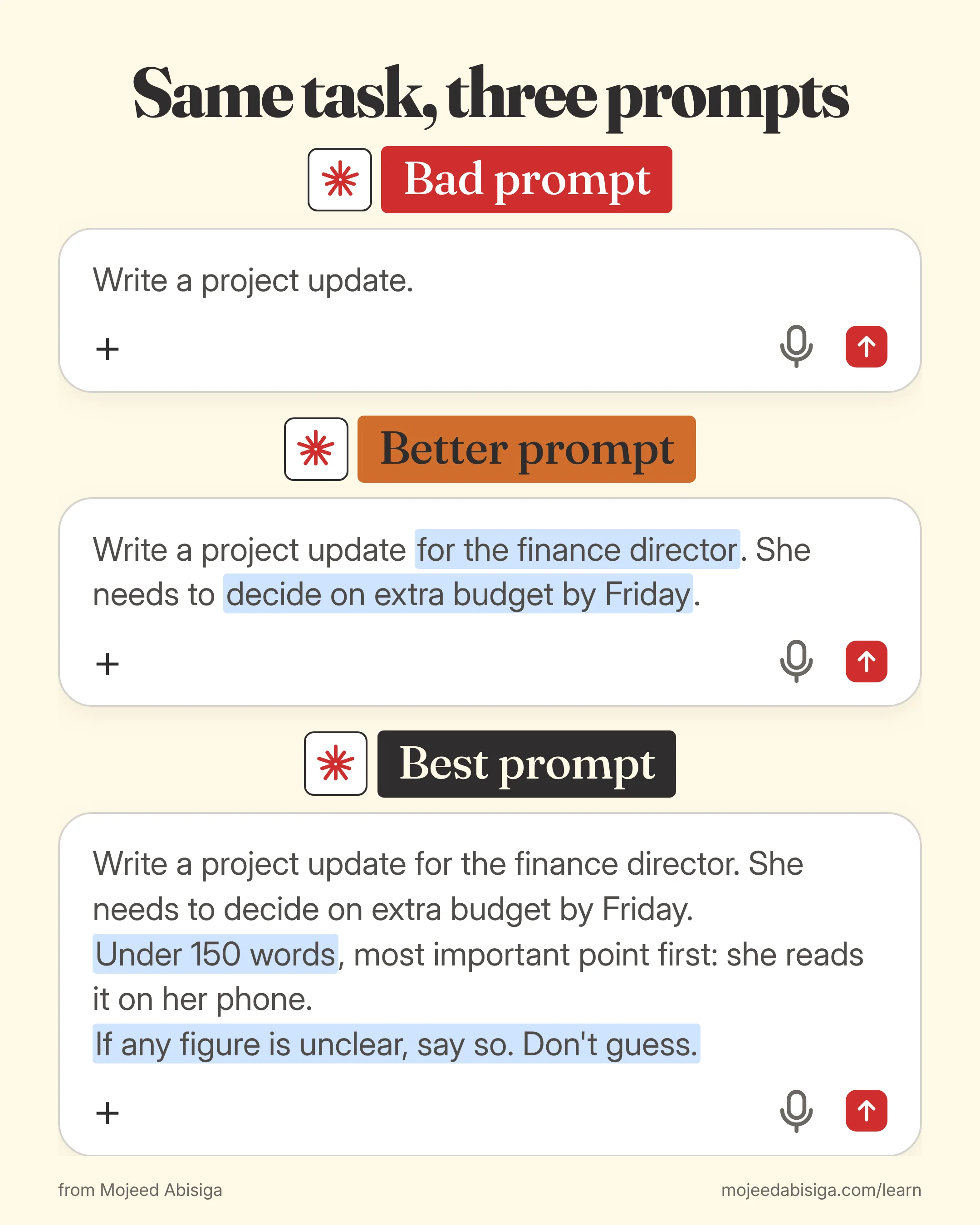
Here's the same request at three levels of detail:
Brief Claude like a colleague: the full guide
Five rules that matter
There are many prompting tricks. Most people need five.
Each one comes from Anthropic's own guidance.
1. Give the goal and the context
Say what you want, who it's for, and why.
The "why" matters more than it looks.
Anthropic's guide shows this with a rule: "NEVER use ellipses." On its own, it's a bare command. Add the reason (the reply will be read aloud by a text-to-speech engine) and Claude can apply the idea to cases the rule never mentioned.
So instead of a bare rule, give the reason behind it.
- Weak: "Keep it short."
- Strong: "Keep it under 100 words. My manager reads these on her phone between meetings."
2. Say what good looks like
Claude can't read your mind about format.
Anthropic's guide says to be specific about the output format and any limits. If order or completeness matters, ask for numbered or bulleted steps.
And if you want more than the minimum, say so out loud. Claude won't assume you want the extra effort.
One more detail from the same guide: tell Claude what to do, not what to avoid.
- Weak: "Don't use bullet points."
- Strong: "Write it as three short paragraphs of flowing prose."
It also helps to write your prompt in the style you want back. A prompt full of bullets tends to get bullets.
3. Show one example
Anthropic calls examples one of the most reliable ways to steer format, tone and structure.
Its developer guide recommends three to five varied examples. Its article for people using the Claude apps is gentler: start with one, and add more only if the output still doesn't match.
That article also warns that newer models pay very close attention to the details in examples.
So pick your example with care. If it has a typo or a strange heading, you may get those back too.
4. Let Claude say "I don't know"
Claude writes confidently even when it's wrong.
Anthropic's help centre says plainly that Claude can "hallucinate" incorrect or misleading information. It says not to rely on Claude as your only source of truth, and to check cited sources and high-stakes advice.
The simplest guard is one sentence. Anthropic's guide to reducing hallucinations says that explicitly giving Claude permission to say "I don't know" can drastically reduce false information.
For long documents, the same guide adds two more moves:
- ask Claude to pull out word-for-word quotes first, then answer from those quotes
- ask it to back each claim with a quote, or take the claim back
Anthropic is careful to say these reduce mistakes, but don't remove them. You still check.
5. Keep it short, and keep the rules few
More words don't mean a better prompt.
Anthropic's article for Claude app users warns against over-engineering: longer, more complex prompts are not always better.
The same article says the first prompt rarely works perfectly. You test, then refine.
It also says the heavy machinery is mostly optional now. XML tags and elaborate role-play are less necessary with modern models. Clear headings, white space and plain, explicit language work just as well for most jobs.
A short role still helps. Anthropic says even a single sentence makes a difference to Claude's tone and behaviour. Something like "You're an experienced HR adviser" is enough.
Three good rules beat fifteen vague ones.
Get the next one in your inbox
One practical guide at a time: the exact steps, the prompts to copy and the mistakes to skip.
Free. Delivered by Substack, one click to unsubscribe. Form not showing? Subscribe on Substack.
Before and after, side by side
Here are the five rules as quick swaps.
| Instead of | Try |
|---|---|
| "Write a project update." | "Write a project update for the finance director. She needs to decide on extra budget by Friday." |
| "Make it professional." | "Three short paragraphs, warm but direct, no jargon." |
| "Don't make it too long." | "Under 150 words: it's read on a phone." |
| "Write it in our style." | "Match the tone of this example: [paste one]." |
| "What are the facts?" | "If you're not sure of something, say so. Don't fill gaps with guesses." |
| Fifteen rules in a row | Three rules, each with a reason |
Notice what the right-hand column has in common.
Every line answers a question a new colleague would ask you.
The one-good-prompt template
This is the template to keep.
It puts the five rules in order, with brackets to fill in. Delete any line you don't need.
You're [a role, in one sentence: e.g. an experienced editor for busy managers].

Goal: I need [the thing you want] so that [what it's for, and who will use it].

Context: [who the reader is, what they already know, what has happened so far, anything I've attached].

Good looks like: [length, format and tone]. Here's an example of the style I want:
[paste one short example]

Rules (only these):
- [rule], because [reason]
- [rule], because [reason]

If you're not sure about something, say so plainly and tell me what you'd need to know. Don't guess.

If something important is missing, ask me up to three questions before you start.
Fill it in once for a task you do every week.
Then save the filled-in version somewhere you can paste it from.
It looks long. Most of it is the context you'd give a new colleague anyway.
The last two lines do quiet, useful work. One gives Claude room to say "I don't know". The other stops it guessing when you forgot something.
Four everyday versions
Here's the template already shaped for four common jobs.
Write an email that sounds like you
Goal: Write a reply to the email below. I want to [agree / say no politely / ask for more time] and keep a good relationship with this person.

Context: [who they are, how well I know them, what's happened so far].

Good looks like: under 120 words, warm and direct, no corporate phrases. End with one clear next step.

Here's an email I wrote that sounds like me:
[paste one of your own emails]

If anything in their email is unclear, point it out instead of guessing what they meant.

Their email:
[paste it]
Summarise a long document
For long material, Anthropic's guide says to put the document near the top and your question at the end. Anthropic says putting the question at the end can improve answers by up to 30% in its tests on very long inputs.
[paste or attach the document first]

You're summarising this for [who], who needs to [decide / act on / understand] it.

First, pull out the word-for-word quotes that matter most for that purpose.

Then write a summary of no more than [five] bullet points, each one based on a quote.

If a point isn't supported by a quote, leave it out. If the document doesn't answer something important, say what's missing.
Think through a decision
Goal: Help me decide between [option A] and [option B].

Context: [the situation, the deadline, what matters most to me and why, what I've ruled out].

Good looks like: a short table of pros and cons for each option, then your recommendation in two sentences.

For every point, tell me how sure you are: high, medium or low. Where you're guessing, say so. If you'd need more information to answer well, ask me first.
Rewrite something in plain words
Rewrite the text below for [who: e.g. customers with no technical background].

Goal: they should understand [the one thing] after one read.

Good looks like: short sentences, everyday words, the most important point first. Keep every fact. Don't add any.

If a term has no plain equivalent, keep it and explain it in brackets.

The text:
[paste it]Mistakes to stop making
Most weak answers come from the same handful of habits.
- The one-liner. "Write a LinkedIn post about AI." Claude can only give you the average post.
- Hidden context. You know who the reader is. Claude doesn't, unless you say.
- Only saying "don't". Anthropic's advice is to say what to do instead.
- Rules without reasons. A reason lets Claude apply the rule sensibly. A bare rule gets followed to the letter, or not at all.
- Rule pile-ups. Fifteen instructions compete. Three get followed.
- Trusting the tone. Confident writing isn't proof. Check names, numbers and sources before anything goes out under your name.
- Five messages instead of one. Anthropic's usage tips say to give background up front and combine related questions in one message. You get a better first answer and use less of your limits.
- Stopping at the first draft. Anthropic itself says the first prompt rarely works perfectly. Refine it.
Ask Claude about your data, the careful way
Three follow-ups worth keeping
The first answer is a draft. These three prompts turn it into a good one.
What did you have to assume to write this? List each assumption, and tell me which ones I should confirm.Go through your answer. For each fact or number, tell me where it came from: something I gave you, a source you can name, or your own general knowledge. Mark anything you're not sure about.Read your answer as [the reader]. What would they find unclear, missing or too long? Fix those things and show me the new version.If an answer isn't working after two rounds, don't keep patching.
Go back and fix the prompt. Then start again.
Claude habits that save time and mistakes
Save your rules once
Some rules apply to everything you write.
Your audience. Your spelling. "No jargon." "Most important point first."
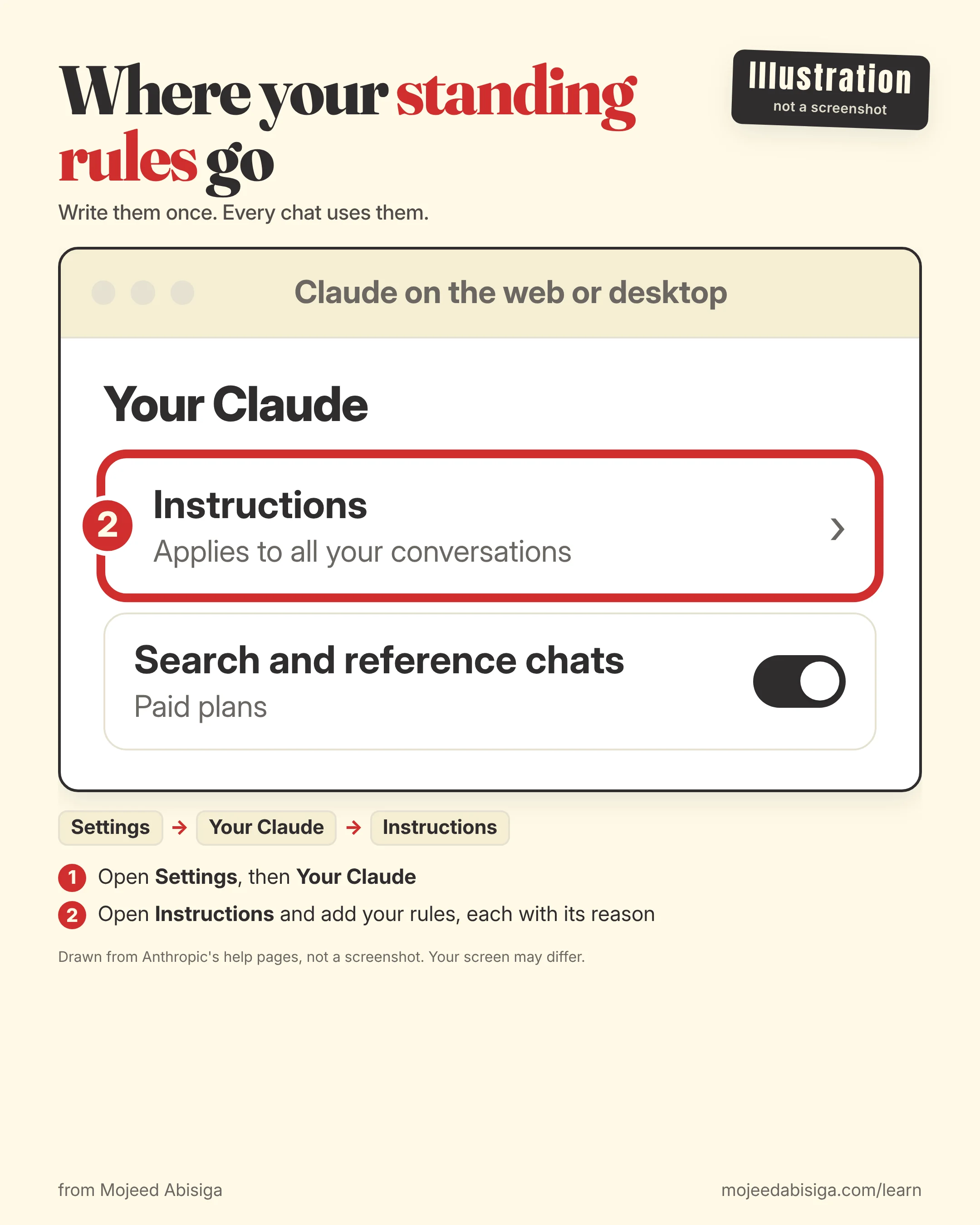
Don't type them into every chat. Put them in Instructions.
Here's where:
- Open Settings.
- Go to Your Claude.
- Open Instructions and add your standing rules, each with its reason.
Anthropic's help centre says these account-wide Instructions apply to all your conversations.
For rules that only belong to one piece of work, use project instructions instead. They apply only inside that project.
I work as [your role] in [your field]. Most of what I write is read by [who].

When you write for me:
- Put the most important point first, because my readers are busy.
- Use plain, everyday words, because many readers aren't specialists.
- If you're not sure about a fact, say so instead of guessing, because I'll use your answers at work.
Keep it short. The same advice about few rules applies here too.
GuideClaude, from day one.Never opened it? Everything you need for your first week, in plain words:A note on effort
Sometimes the prompt is fine and the job is just hard.
In the Claude apps you can give Claude more room to think. Click the model name next to the send button, click Effort, and pick a level.
Anthropic says Low and Medium suit routine tasks and stretch your usage further. Higher effort uses more.
So keep routine work on a lower level. Save the higher levels for the hard problems.
What to do today
Pick one task you'll do with Claude this week.
Fill in the template for it. Every bracket.
Run the colleague test: would a smart newcomer know what to do?
Then send it, and ask one of the three follow-ups.
Save the version that worked. That's your first reusable prompt.
Get the next issue by email
One practical guide at a time: the exact steps, the prompts to copy and the mistakes to skip.
Free. Delivered by Substack, one click to unsubscribe. Form not showing? Subscribe on Substack.
Send this to one colleague who says AI "only gives generic stuff".
Mojeed