Newsletter · claude
Write it plain.
AI drafts that sound like everyone else's? Here's the fix, step by step:

You ask Claude to write an email.
It comes back fast, tidy and correct.
And you can tell from the first line that a machine wrote it.
Long words. Warm-up sentences. A summary at the end that repeats the start.
Nothing is wrong with it. It just sounds like nobody.
There's no magic phrase. What works is a small kit you set up once.
I teach people to use AI at work, and my mission is to make data and AI easy for everyone. Plain writing is the skill that makes every AI draft more useful.
What's inside:
- Why AI drafts come out bland
- What "plain" actually means, from official sources
- A short style instruction to add to every writing request
- A swap list of words and patterns to cut
- A research-first prompt to run before any piece of writing
- Ready-made versions for four everyday jobs
- A check you can run on any draft
Get the next one in your inbox
One practical guide at a time: the exact steps, the prompts to copy and the mistakes to skip.
Free. Delivered by Substack, one click to unsubscribe. Form not showing? Subscribe on Substack.
Why AI drafts come out bland
Anthropic's prompting guide gives a useful picture.
Treat Claude like a brilliant but new employee. Clever, but with no context on your norms or how your team works.
Ask that new hire to "write an email to the client" and you'll get the safe, average email.
The same guide says the more precisely you explain what you want, the better the result.
So when you don't describe a style, Claude picks a default one. And the default is polished, formal and wordy.
Three gaps cause most of it:
- No reader. Claude doesn't know who will read the piece, so it writes for everyone.
- No style. "Make it professional" is a mood, not an instruction.
- No facts. When the facts are thin, the words get fat. Filler fills the space.
This issue closes all three gaps.
What "plain" actually means
"Write in plain English" sounds vague. It isn't.
Governments have written it down in detail, because their readers include everyone.
In the US, the Plain Writing Act of 2010 defines plain writing as writing that is clear, concise, well-organized and suited to the subject and audience.
In the UK, plain English is mandatory for all of GOV.UK. The Government Digital Service points to literacy data: 1 in 6 adults in England has very poor literacy skills.
And plain doesn't mean simple-minded.
Digital.gov, which now carries selected PlainLanguage.gov guidance, puts "write for your audience" first. It calls "dumbing down" a common myth. You match your readers' knowledge, expertise and interest.
So an expert reader can still get technical terms. A new customer gets everyday words.
The rules, side by side
Here's what three official sources say, in numbers you can hand to Claude.
| Rule | GOV.UK | Digital.gov | Simplified Technical English |
|---|---|---|---|
| Sentence length | Try to split sentences over 25 words | One idea per sentence | 20 words for instructions, 25 for descriptions |
| Paragraphs | No more than 5 sentences | 3 to 8 sentences, under 150 words, never over 250 | One topic per sentence |
| Voice | Active: "You need an electronic travel authorisation" | Everyday language | Active, with commands for steps: "Install the component." |
| Words | Short over formal: "buy" not "purchase" | Cut filler like "very" and "really" | About 900 approved words, one meaning each |
| Order | Most important information first | Write for your audience first | Not stated |
The third column needs a word of explanation.
Simplified Technical English (STE) is a controlled language first released in 1986 to help readers of English maintenance documentation. Its makers say it isn't meant for general writing. But they also say its principles, short sentences, one topic per sentence and the active voice, work well in other writing.
That makes it a good model for one job in particular: instructions people must follow.
The style instruction
Here's the core of the kit.
One short instruction that you add to every writing request. Or better, save once (next section).
Two pieces of Anthropic's advice shape it.
First, give the reason behind a rule. Anthropic's guide shows a bare rule, "NEVER use ellipses", next to a better one that explains the reply will be read aloud. With the reason, Claude can apply the idea to cases the rule never named.
Second, say what to do, not only what to avoid. Ask for "flowing prose paragraphs" instead of "don't use markdown".
So every line below says what to do, and most say why.
Write in plain English for [who reads this: e.g. busy managers who read on their phones].

- Use short, everyday words: "buy" not "purchase", "help" not "assist", "use" not "utilise". Short words are faster to read.
- Keep sentences under 25 words, with one idea each. Long sentences lose readers.
- Put the most important point first. Most people scan and stop early.
- Use the active voice and talk to the reader as "you".
- Write short paragraphs of one to three sentences. Use a list only when order matters.
- Explain any technical term in plain words the first time you use it.
- Start with the answer and stop when you're done: no warm-up line, no closing summary.
- Keep every fact I give you. Add no facts, numbers or quotes of your own. If something is missing, tell me.
It's eight lines. That's deliberate.
Anthropic's article for Claude app users warns that longer, more complex prompts are not always better. A few clear rules beat a pasted style manual.
Fill in the first line for each job. The reader changes; the rules mostly don't.
Add one example
Words describe a style. An example shows it.
Anthropic calls examples one of the most reliable ways to steer tone and structure. Its article for app users says to start with one and add more only if the output still doesn't match.
It also warns that newer models pay very close attention to details in examples. So pick a clean one you'd be happy to see copied.
Here is a short piece I wrote that sounds like me. Match its tone, sentence length and word choice. Don't copy its content.

[paste 100 to 200 words of your own writing]Save it once
Pasting the instruction into every chat works. Saving it is better.
You have two places to put it.
For everything you write: open Settings, then Your Claude, then Instructions, and paste it there. Anthropic's help centre says these account-wide instructions apply to all your conversations.
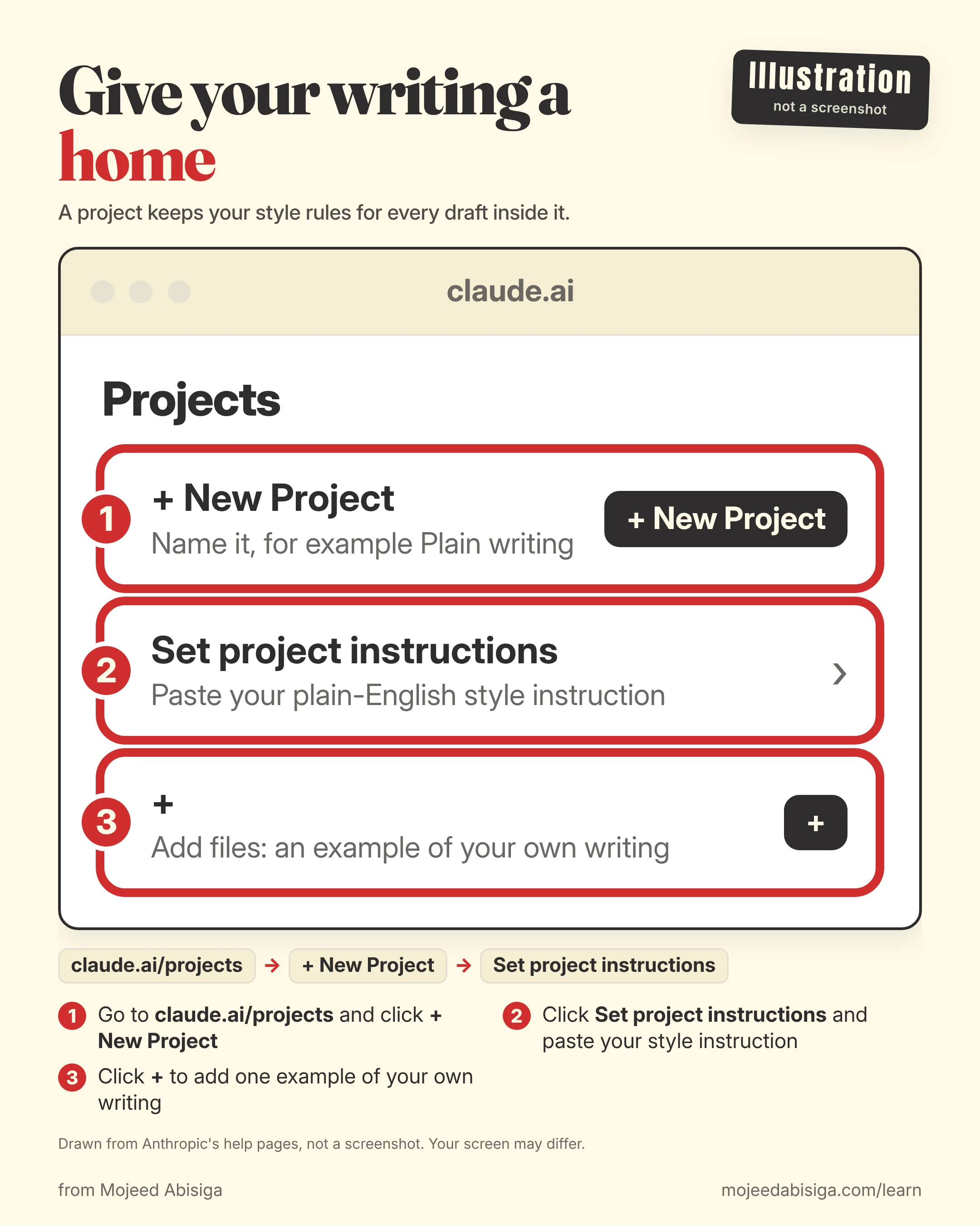
For writing only: make a project. Project instructions apply only inside that project, so your other chats stay as they are.
To make one:
- Go to claude.ai/projects and click + New Project. Call it something like "Plain writing".
- Click Set project instructions and paste your style instruction.
- Click + to add files, such as one example of your own writing.
Anthropic's project help page says projects are open to all users, and free accounts can create up to five. But its personalization page marks project instructions as paid-plans-only. If you don't see Set project instructions, use the account-wide instructions above instead.
Then start every writing job inside that project. The rules come with it.
The swap list
Most "AI-sounding" writing comes from a small set of words and habits.
A ban list helps. But remember Anthropic's advice: say what to do instead. So each item below comes with its swap.
Words to swap
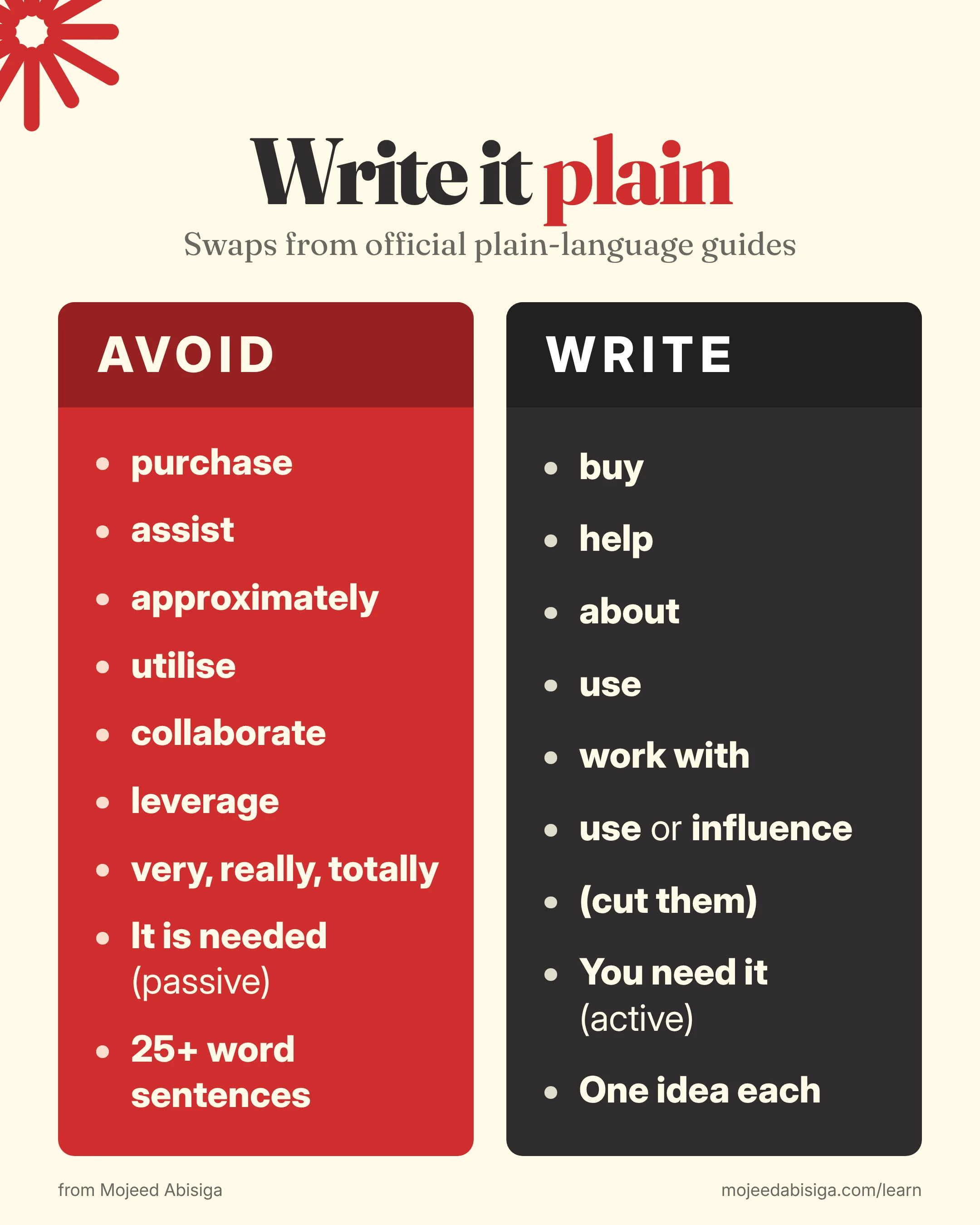
The first six come straight from GOV.UK's guidance and its A to Z style guide, which keeps a "Words to avoid" list.
| Instead of | Write |
|---|---|
| purchase | buy |
| assist | help |
| approximately | about |
| utilise | use |
| collaborate | work with |
| leverage | use, or influence |
| in order to | to |
| facilitate | help, run, make easier |
| additionally, furthermore, moreover | also, and, or nothing |
| crucial, vital, pivotal | important, or say why it matters |
| comprehensive | full, complete, or cut it |
| foster, empower | help, let |
| showcase | show |
| streamline | simplify, speed up |
Then cut the filler. Digital.gov names absolutely, actually, completely, really, quite, totally and very as usually unnecessary, and sometimes nonsensical.
Patterns to swap
Words are half of it. The other half is shape.
- The warm-up. Praising the question or restating it. Swap: start with the answer.
- The echo ending. "In conclusion" and a summary of what you just read. Swap: stop after the last useful point.
- The trio. Three adjectives where one would do: "clear, concise and compelling". Swap: pick the one that's true.
- The fake contrast. "Not just a tool, but a partner." Swap: say what it does.
- The self-answered question. "The result? Faster reports." Swap: "Reports got faster."
- Hedge stacks. "This may potentially help." Swap: one hedge, or none if you're sure.
- Bold everywhere. Swap: bold the one phrase a scanner must see.
- The offer at the end. "Let me know if you'd like me to..." Swap: nothing. You'll ask.
- The passive. "A decision was made." Swap: say who: "We decided."
When you write for me, also apply these swaps:
- formal words → everyday words (purchase → buy, utilise → use, in order to → to, facilitate → help)
- linking words like additionally, furthermore, moreover → "also", "and", or a new sentence
- filler (very, really, actually, quite, totally) → cut it
- a question you answer yourself → a plain statement
- three adjectives in a row → the one that's true
- a closing summary or an offer to help further → end after the last useful point
- passive sentences → say who does whatShare this list with one colleague whose reports get skimmed.
Research first, then write
Here's the part most people skip.
Bland writing is often a facts problem.
When Claude has nothing specific to say, it fills the space with general words. Give it real facts and the writing tightens on its own.
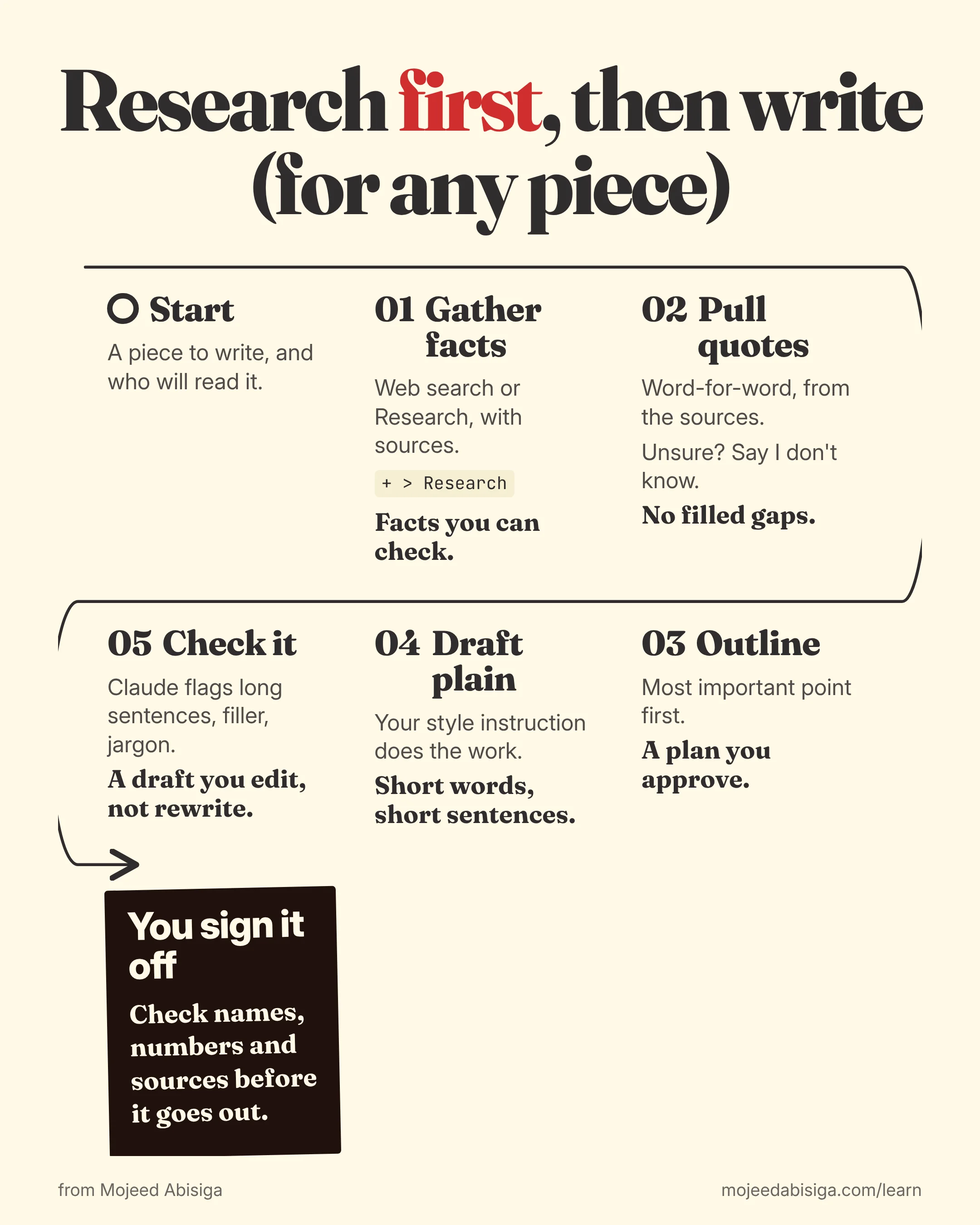
So before any piece that matters, run a research step. And keep it separate from the writing.
Two Claude features help here.
Web search finds facts and gives answers with citations. Turn it on with +, then Web search. Anthropic's help page says the new Claude experience has no switch: Claude searches when it helps. Free accounts can use it.
Research runs several searches that build on each other, across the web and your connected tools. It's on paid plans. Turn it on with +, then Research.
Then use this prompt.
I'm going to write [what: e.g. a one-page update] for [who].
After reading it, they should [know / decide / do] [what].

Before you write anything, research:

1. Find the facts I'll need on [topic]. Use sources you can link to, and prefer official and primary ones.
2. List each fact as a short bullet with its source link and the exact words from the source in quotes.

3. Mark anything you couldn't confirm as "not confirmed". If you don't know, say "I don't know". Don't fill gaps with guesses.

4. Suggest an outline: the most important point first, one idea per section.

Stop there. Don't write the draft until I've checked the facts and the outline.
Each line has a reason.
Anthropic's guide to reducing hallucinations says that giving Claude permission to say "I don't know" can drastically reduce false information.
The same guide suggests pulling out word-for-word quotes first and basing the answer on them. Anthropic is clear that this reduces mistakes but doesn't remove them.
That's why the prompt stops before the draft. You check the facts while they're still a short list, not buried in polished paragraphs.
Once you've checked them:
Good. Now write the [piece] using only the facts I approved above, following my plain-English style instruction.
Length: [about N words]. Format: [e.g. short paragraphs, no headings].
Where a fact was "not confirmed", leave it out.
Ask Claude about your data, the careful way
Four everyday versions
Your style instruction does most of the work. These add what each job needs on top.
An email people answer
Write a reply to the email below. I want to [agree / say no / ask for more time].
Reader: [who they are and how well I know them].
First sentence: the answer or the decision. Then the reason, in one or two sentences. Then one clear next step with a date.
Under 120 words. Talk to them as "you".

Their email:
[paste it]
Instructions people can follow
This one borrows from Simplified Technical English: commands, one action per step, short sentences.
Turn the notes below into step-by-step instructions for [who].
- One action per numbered step, written as a command: "Open the report", not "The report should be opened".
- Keep each step under 20 words.
- Use the same word for the same thing every time. Don't vary it for style.
- If a step needs a warning, put it before the step, not after.

My notes:
[paste them]
A summary for busy leaders
GOV.UK says most people read only 20 to 28% of the text on a webpage. So the point goes at the top.
Summarise the document below for [who], who needs to [decide / act on] it.
Line 1: what they need to know or decide, in one sentence.
Then up to five bullets, each one fact with its number.
Explain any technical term in brackets. If the document doesn't answer something important, say what's missing.

[paste or attach the document]
A post in your own voice
Write a short post for [where: e.g. LinkedIn] about [the one idea].
Reader: [who follows me and what they care about].
Use only these facts: [paste them].
Match the voice of this example I wrote: [paste one of your posts].
One idea per sentence. No hashtags in the text. End on the point, not a question.
Get the next one in your inbox
One practical guide at a time: the exact steps, the prompts to copy and the mistakes to skip.
Free. Delivered by Substack, one click to unsubscribe. Form not showing? Subscribe on Substack.
Check every draft
Even with good rules, drafts drift.
So run a check before you edit by hand. It finds the problems; you decide the fixes.
Check the draft below against plain-English rules. Don't rewrite it yet.

List, with the exact text:
1. Every sentence over 25 words
2. Every passive sentence, with an active version
3. Every formal word, with a shorter one
4. Every filler word (very, really, actually, quite, totally)
5. Any technical term that isn't explained
6. Any paragraph over 5 sentences
7. Whether the most important point comes first. If not, what should.

Then give me a corrected version that keeps every fact and changes nothing else.

[paste the draft]
Then read the result yourself. Out loud, if you can.
ASD's working group behind Simplified Technical English published a white paper on AI in June 2026. Its view: AI tools can support writing, but they can't replace human oversight. AI should assist human authors, not replace them.
That's the right rule for your inbox too.
Build better habits with Claude
Mistakes to avoid
- "Make it sound human." Too vague to act on. Anthropic's test: if a colleague would be confused by your prompt, Claude will be too. Name the rules instead.
- A ban list with no swaps. Claude needs to know what to write instead.
- Dumbing it down. Plain isn't childish. Match your reader's level.
- Pasting a whole style manual. Eight clear rules beat eighty. Anthropic warns that longer prompts aren't always better.
- Polishing thin facts. If the draft is vague, go back to the research step, not the style rules.
- Trusting the first draft. Anthropic says the first prompt rarely works perfectly. Test and refine.
- Skipping your own read. You sign it. You check it.
What to do today
- Copy the style instruction. Fill in your reader.
- Save it in Settings → Your Claude → Instructions, or in a "Plain writing" project.
- Add one short example of your own writing.
- For your next real piece, run the research prompt first.
- Run the plain-English check on the draft before you send it.
That's the whole kit. Set it up once and every draft starts closer to done.
Get the next issue by email
One practical guide at a time: the exact steps, the prompts to copy and the mistakes to skip.
Free. Delivered by Substack, one click to unsubscribe. Form not showing? Subscribe on Substack.
Send this to one colleague whose AI drafts all sound the same.
Mojeed