Newsletter · claude
Opus 5.5, in plain words.
What changed, which Claude to pick for which job, and how to switch:

There's a new Claude in your model menu.
It's called Opus 5.5.
You've seen the headlines and the benchmark charts.
But you have one simple question: should I use it, and for what?
This issue answers that, in plain words.
I teach people to use AI at work, and this is the question I hear after every new model.
So every number here comes from Anthropic's own announcement and documentation. No hype, and no made-up tests.
Inside:
- What changed, in five lines
- What Anthropic tested, and the results
- Opus 5.5 vs Opus 5 vs Sonnet 5.5 vs Haiku 5.5
- Which model to use for which job
- Four prompts that make Claude double-check itself
- What you do not need to relearn
- How to switch, in three clicks
Get the next one in your inbox
One practical guide at a time: the exact steps, the prompts to copy and the mistakes to skip.
Free. Delivered by Substack, one click to unsubscribe. Form not showing? Subscribe on Substack.
What changed, in five lines
Anthropic announced Claude Opus 5.5 on September 22, 2026.
It was the first model in the Claude 5.5 family. Sonnet 5.5 and Haiku 5.5 followed.
Here's what Anthropic says is new, compared with Opus 5:
- Smarter. It performs at the level of Claude Fable 5.1 on most work, according to Anthropic.
- Cheaper to run. Anthropic says it costs 40% less to run than Opus 5 on typical workloads at default settings.
- Faster. Anthropic says it writes its answers more than 30% faster than Opus 5.
- Easier to read. It puts the most important information first, uses less jargon, and follows the writing rules you give it.
- More room to work. Anthropic also raised five-hour usage limits on Pro, Max, Team and seat-based Enterprise plans at launch, and gave subscribers one rate limit reset to use when they choose.
That fourth point matters more than it looks.
Anthropic writes that, in its own use, the clearer writing made Opus 5.5's work "easier to follow and check".
Work you can follow is work you can check. We'll come back to that.
What Anthropic tested
Everything below is what Anthropic published.
Treat it that way: these are the maker's own numbers, not independent tests.
Real-world work
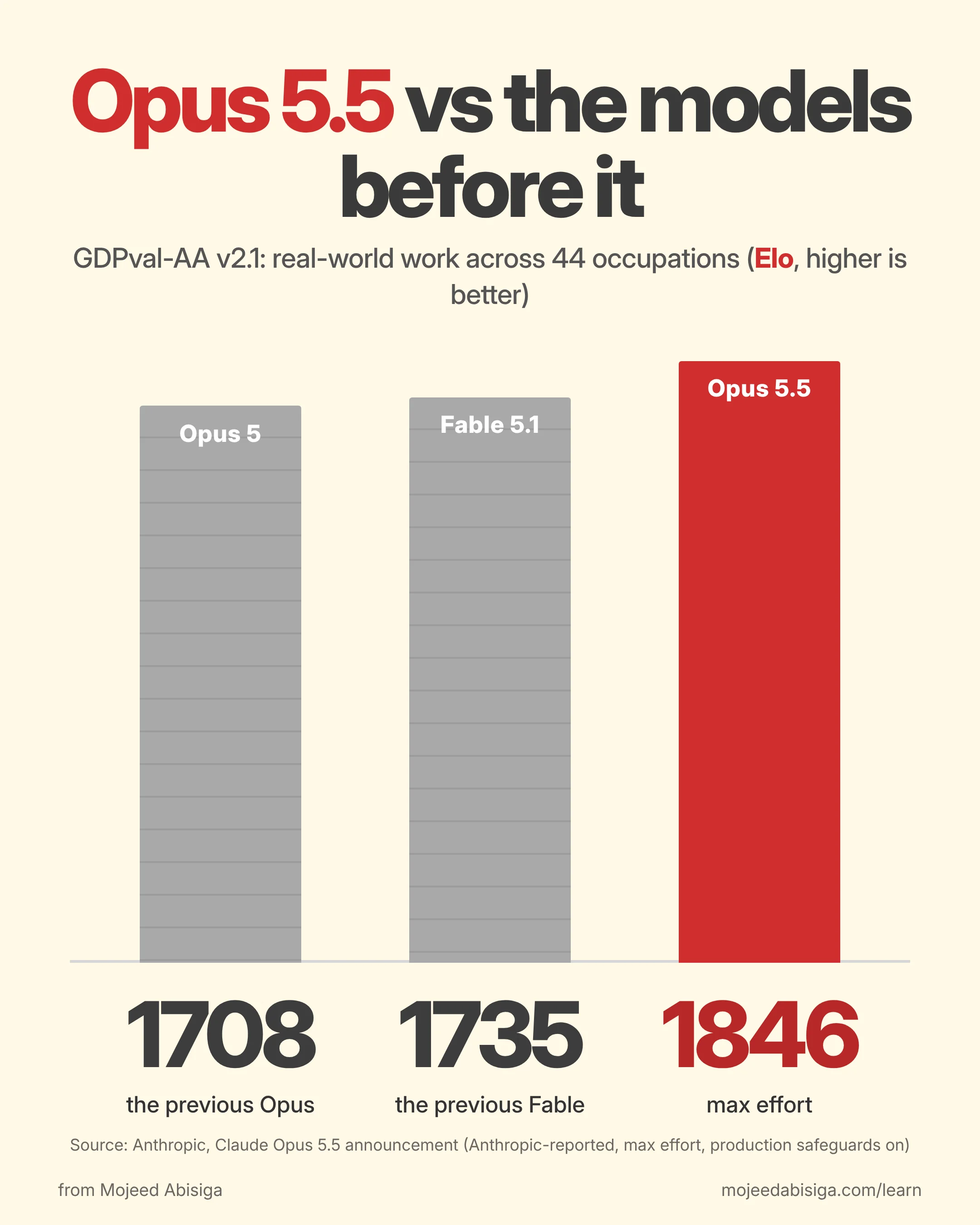
Anthropic reports results on GDPval-AA v2.1, a test of real-world work across 44 occupations.
On that test, Anthropic gives these scores:
- Opus 5.5: 1846
- Fable 5.1: 1735
- Opus 5: 1708
Coding
On Terminal-Bench 4.0, a coding test, Anthropic reports 66.4% for Opus 5.5 and 52.3% for Opus 5.
Anthropic also cites examples from testers. One completed a 680,000-line code migration in under a day. In another case, Opus 5.5 succeeded 39 of 40 times at cutting load times in a web app.
Research without made-up numbers
Pay the most attention to this one.
Anthropic asked Opus 5.5, Fable 5.1 and Opus 5 to write a report on a company's quarterly results, using only what they could find on a copy of the web.
An automated grader checked every figure and every quote against the sources. One invented figure or quote meant a fail.
Across effort settings, Anthropic says 16 of 18 Opus 5.5 reports passed.
Neither Fable 5.1 nor Opus 5 passed in any attempt.
Send this to one colleague who keeps asking "which Claude should I use?"
Opus 5.5 side by side
Here's how the models compare, using only what Anthropic publishes.
| Opus 5 | Opus 5.5 | Sonnet 5.5 | Haiku 5.5 | |
|---|---|---|---|---|
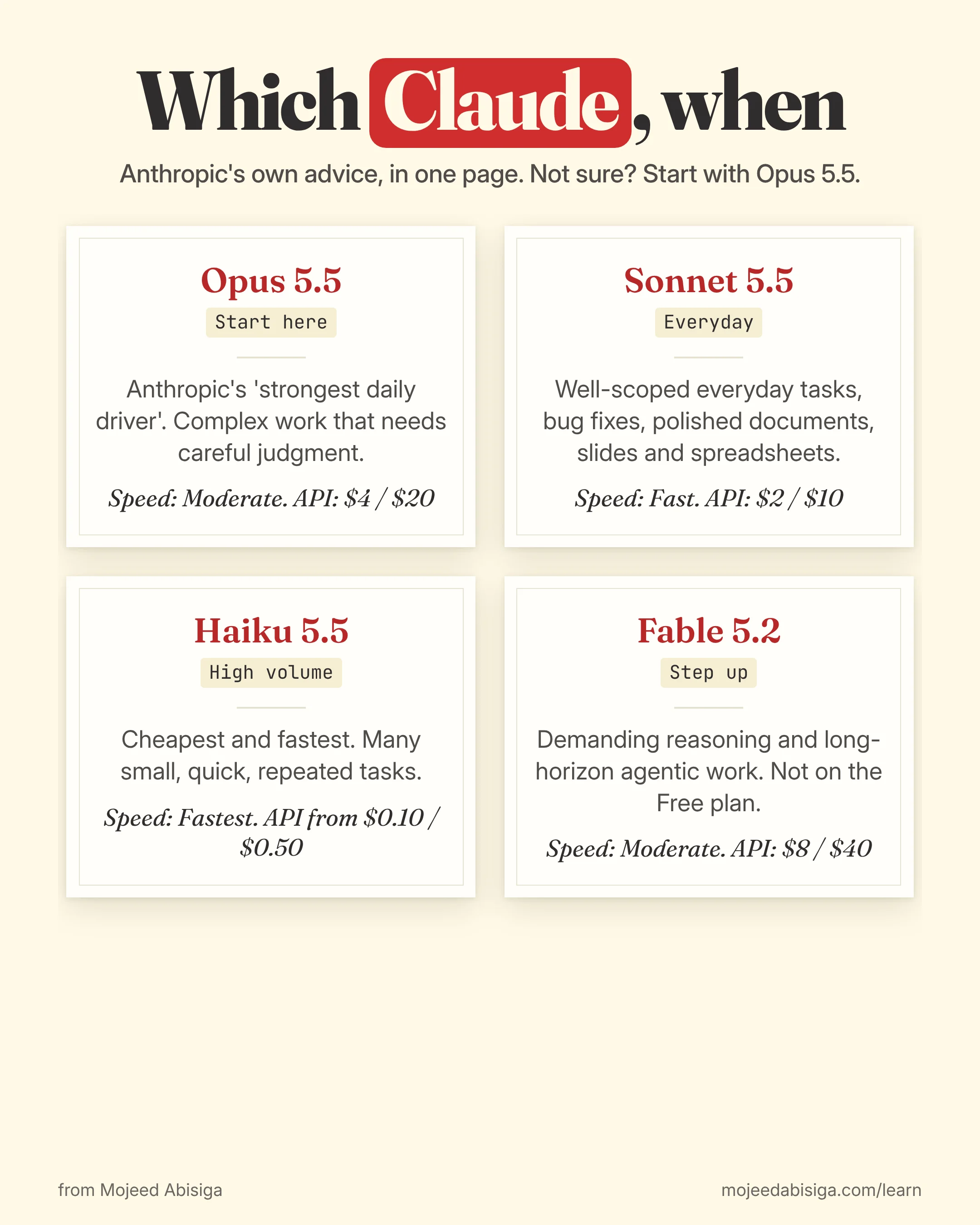
| What Anthropic says it's for | The previous Opus | Complex work that needs careful judgment | Well-scoped everyday tasks, polished documents, slides and spreadsheets | High-volume, quick tasks |
| Speed (Anthropic's label) | Opus 5.5 writes 30%+ faster | Moderate | Fast | Fastest |
| Knows the world up to | May 2026 | June 2026 | June 2026 | June 2026 |
| Text it takes in at once (paid plans) | 1M tokens | 1M tokens | 1M tokens | 1M tokens |
| API price per million tokens (in / out) | Opus 5.5 is 20% cheaper | $4 / $20 | $2 / $10 | from $0.10 / $0.50 |
| On the Free plan? | No | No | Yes | Yes |
A few notes, so the table doesn't mislead you:
- API prices are what developers pay. In the Claude app on Free, Pro, Max or Ultra, you pay your plan price, and the model you pick changes how fast you use your limits.
- Free plan: Anthropic's pricing table shows Sonnet and Haiku on Free. Opus is on Pro, Max and Ultra.
- Above Opus sits Claude Fable 5.2, which Anthropic describes as for demanding reasoning and long, multi-step agent work. It's on paid plans only.
What about Sonnet 5.5?
Anthropic announced Sonnet 5.5 on September 28, 2026.
It says Sonnet 5.5 runs 30% or more faster than Sonnet 5 and costs up to 30% less for most work.
Anthropic puts it plainly: Sonnet 5.5 is strongest at well-scoped everyday tasks. Opus 5.5 is for complex work that needs careful judgment.
And Haiku 5.5?
Anthropic announced Haiku 5.5 on October 7, 2026.
It calls it its cheapest, fastest and most capable small model, built for high-volume work.
It's also the first Haiku that lets you adjust the effort setting.
NewsletterRight tool, right job.Stop looking for one AI that does everything. Five everyday jobs, and where to start for each:Which model for which job
Anthropic calls Opus 5.5 its "strongest daily driver".
Its advice: start most work with Opus 5.5. Move up to Fable when the job needs more. Move down to Sonnet 5.5 or Haiku 5.5 when it needs less.
Here's how that looks in a normal work week.
Use Opus 5.5 when
- the answer needs judgment: a recommendation, a risk, a trade-off
- you're giving it a long document, many files or a messy problem
- you'll send the result to someone who matters
- you're not sure which model to use
Use Sonnet 5.5 when
- the job is clear and well defined
- you want a polished document, a slide deck or a spreadsheet
- you want the answer quickly
Use Haiku 5.5 when
- it's a small, quick job you do over and over
- speed matters more than depth
Step up to Fable 5.2 when
- the reasoning is genuinely hard and Opus 5.5 isn't getting there
Not sure how your limits work? This is the guide for that.
Make Claude double-check itself
A smarter model still makes mistakes.
Anthropic's help centre says Claude can "hallucinate": give incorrect or misleading information. It says not to rely on Claude as your only source of truth, to scrutinise high-stakes advice, and to check cited sources.
It also says Claude can be wrong about its own abilities, for example claiming it sent an email when it has no tool to do that.
So add one step to any work that matters: ask Claude to check itself before you check it.
Opus 5.5 is a good partner for this. Anthropic says its writing is easier to follow and check. One early tester, quoted on Anthropic's announcement, says it "checks its own work in creative ways".
Here are four prompts to copy.
1. Check the facts
Use this after any answer with numbers, names or dates.
Before I use this, check your answer.

List every number, name, date and quote you used.
For each one, tell me where it came from: the file I gave you, a source you found, or your own knowledge.
Mark anything you can't trace to a source as "unverified".
Don't fix anything yet. Just show me the list.
2. Check it against my brief
Use this when Claude wrote something for you: an email, a report, a plan.
Read my original request again, then read your draft.

Make a table with three columns: what I asked for, whether your draft does it (yes, partly, no), and what's missing.
Then fix only the rows marked "partly" or "no", and show me the new version.
3. Argue against yourself
Use this for recommendations and decisions.
Now take the other side.

Give me the three strongest reasons your recommendation could be wrong.
For each one, say what I would need to check to find out.
Then tell me if you'd still make the same recommendation, and why.
4. Check the actions, not just the words
Use this when Claude says it did something.
List every action you said you took in this chat: files made, searches run, messages sent.
For each one, tell me whether you actually did it with a tool, or only described it.
Give me the file name or link for anything you made.Want the full checking habit? This issue walks through it for skills, and the same idea works for any answer.
NewsletterCheck a skill before you trust it.A Claude skill can run code on your behalf. Here's what can go wrong, and the five-minute check to run first:What you do not need to relearn
You don't need to relearn Claude.
Here's what Anthropic's docs say carries over:
- The model menu. It's in the same place, next to the send button.
- Effort. The same levels: Low, Medium, High, Extra high and Max. Anthropic says the default in the Claude apps is Medium.
- Thinking stays on. Anthropic says thinking can't be turned off on Opus 5.5, Opus 5, Sonnet 5.5 or Haiku 5.5. To make Claude think less, choose a lower effort.
- The amount of text it takes in. Opus 5 and Opus 5.5 both take up to 1M tokens in chat on paid plans.
- Zero data retention. Like previous Opus models, Anthropic says Opus 5.5 is available with zero data retention.
- Your prompts. A good brief is still a good brief. If anything, Anthropic says Opus 5.5 follows your writing rules more closely.
Two things that might surprise you
Claude may switch models for some requests. Anthropic says Opus 5 and Opus 5.5 run safety checks on every request. Higher-risk cybersecurity requests may be answered by Opus 4.8, and some biology requests by Opus 5. That's expected, not a bug.
Research has its own model. Anthropic says Claude's Research feature runs on Opus 5.5, whatever model you picked for the chat.
One thing that's leaving
Anthropic says Sonnet 4.6 leaves the model selector on Free, Pro, Max and Ultra on December 8, 2026. Its recommended replacement is Sonnet 5.5.
If you still use Sonnet 4.6, switch now so nothing surprises you later.
How to switch, in three clicks
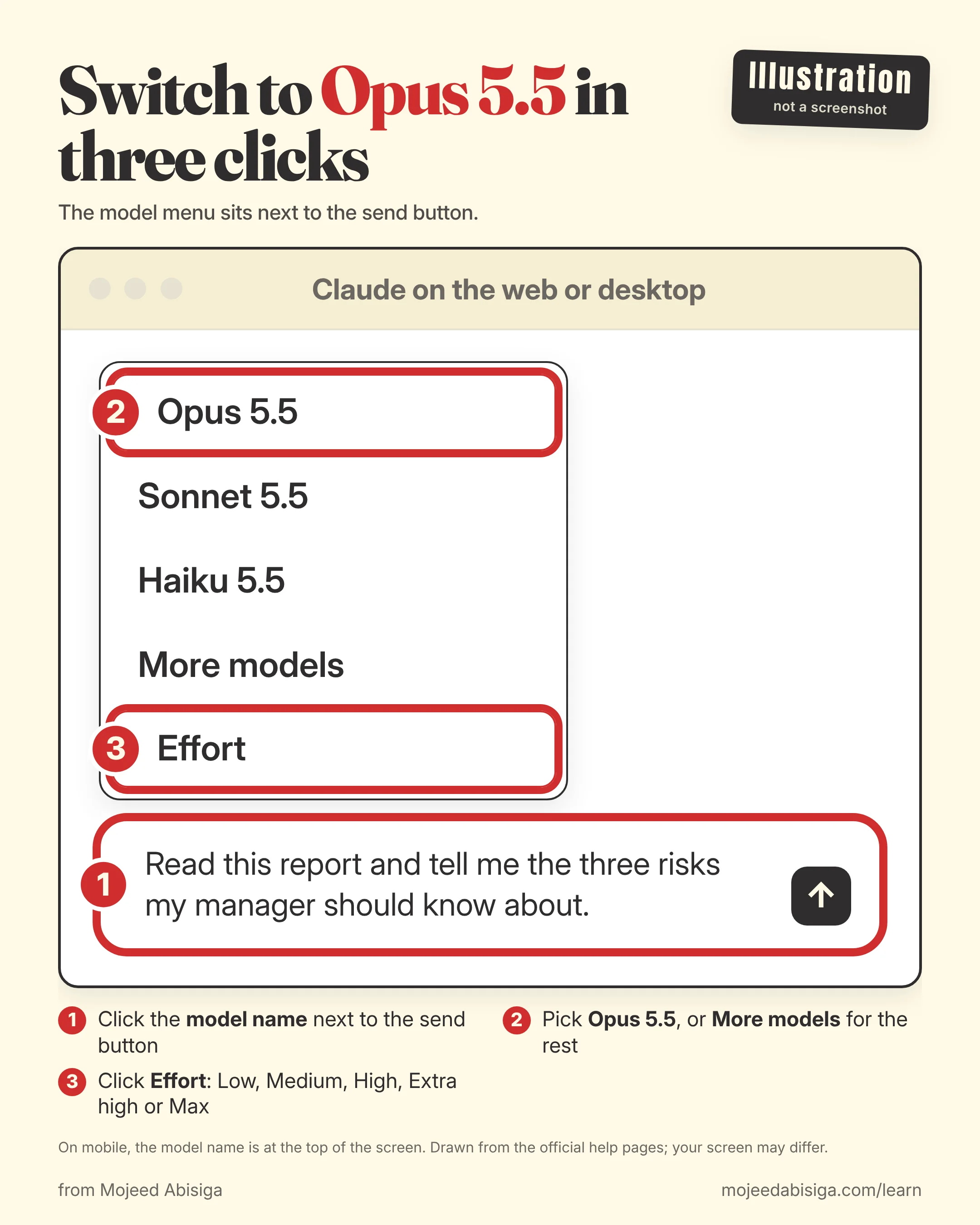
Here's the exact path, from Anthropic's help centre.
- Find the model name. On the web and the desktop app, it's next to the send button, below where you type. On mobile, it's at the top of the screen.
- Click it, then pick Opus 5.5. Click More models to see the rest.
- Click Effort and choose a level. Start with the default, Medium.
Anthropic says the change applies from Claude's next response.
When to change the effort
- Low or Medium: everyday questions, drafts, summaries.
- High: a long document, a tricky analysis, a decision.
- Extra high or Max: the hardest jobs, when you can wait.
Anthropic says higher effort is more thorough but takes longer and uses more of your limits.
Try it on one real task
Pick a task you did last week with another model. Run it again with Opus 5.5 at Medium.
I'm trying a new model on a task I do often.

Here's the task: [describe the task and paste the material].
Here's who will read the result: [your manager, a client, your team].
Here are my writing rules: short sentences, the main point first, no jargon.

Do the task. Then, in three lines, tell me what you were least sure about.
Compare the two answers yourself. That's the only test that matters for your work.
For developers
Anthropic says Opus 5.5 is available on all platforms, including Amazon Web Services, Google Cloud and Microsoft Azure. The model ID is claude-opus-5-5.
What to do today
Open Claude.
Click the model name next to the send button and pick Opus 5.5.
Leave effort on Medium.
Run one real task from your week.
Then paste the "Check the facts" prompt and see what it flags.
You'll learn more about your own work than any benchmark can tell you.
Get the next one in your inbox
One practical guide at a time: the exact steps, the prompts to copy and the mistakes to skip.
Free. Delivered by Substack, one click to unsubscribe. Form not showing? Subscribe on Substack.
Send this to one person on your team who still uses the default without knowing why.
Mojeed