Newsletter · careers
Proof gets you hired.
Your AI certificates are a good start. Here's how to build the proof that comes next:

You finished the course.
You passed the quiz.
You added the certificate to your profile.
Then nothing happened.
No calls. No clients. No change at work.
I want to be clear before anything else: that certificate was worth earning. I hold several myself.
But a certificate is where proof starts. It isn't the proof.
This issue is about the gap between the two, and how to close it.
Inside:
- What a certificate really shows
- Why it can't stand on its own any more
- What an employer or client can actually check
- How to build one piece of proof, with AI as your coach
- How to write it up and put it where people look
- The one line never to cross
Get the next one in your inbox
One practical guide at a time: the exact steps, the prompts to copy and the mistakes to skip.
Free. Delivered by Substack, one click to unsubscribe. Form not showing? Subscribe on Substack.
Certificates are a good start
I'm a data and AI leader and educator. My mission is to make data and AI easy for everyone.
I hold the Microsoft Professional Degree in Data Science. I'm a Celonis Analyst and Data Engineer. IBM gave me its Big Data Engineer Mastery Award.
I'm proud of every one of them.
Each one made me learn things I'd have skipped on my own. Each one gave me a structure, a deadline and a test.
That's what a good course does.
Some good AI courses are free, too. Anthropic's learning site, Claude Academy, costs nothing. A free Claude account saves your progress and earns completion badges.
Its "AI Fluency: Framework and foundations" course is 14 lessons, one quiz and about four hours.
Google AI Essentials takes under five hours and needs no experience. In the U.S. and Canada it costs $49 a month after a seven-day free trial.
So take the course. Learn the thing. Keep the certificate.
What a certificate actually shows
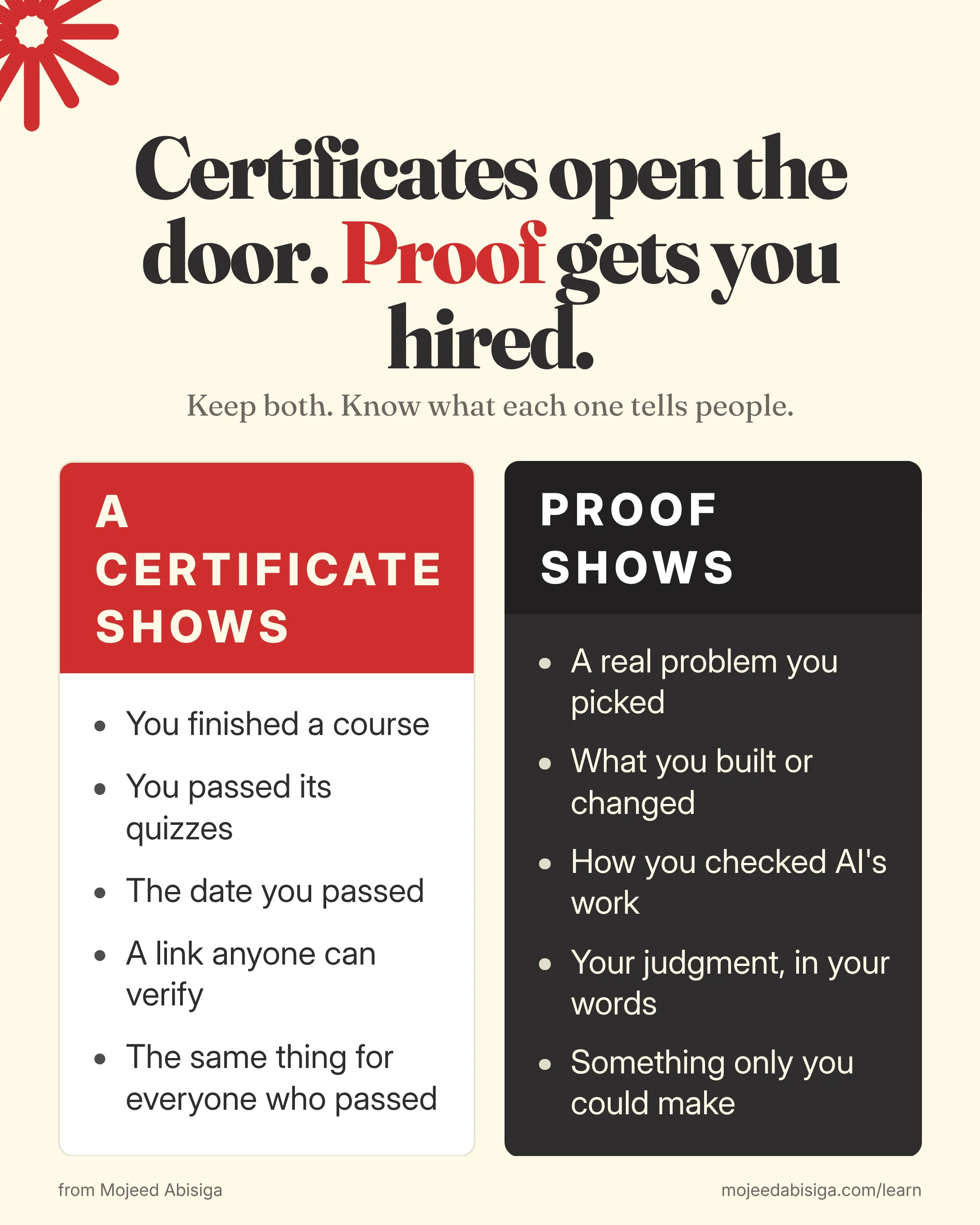
Read the small print on any certificate and it's honest about what it is.
Claude Academy says its badges record that you completed the course as it existed when you took it. The issue date sits on the verification page.
You earn the badge by passing the quizzes. Every lesson quiz, plus any final assessment.
Anyone can check it's genuine through a public link.
That's real. It's also narrow.
Here's what that same certificate can't show:
- the problem you'd solve on day one
- how you'd handle messy, real data or a vague brief
- whether you check AI's work before you send it
- how you explain a result to someone who isn't technical
- your judgment
Claude Academy is careful here too. It says its completion badges are not certifications. Claude certification exams are a separate paid, proctored program, and only companies in Anthropic's partner program can get them.
Different credentials test different things. That's fine, as long as you know which one you hold.
Everyone has the certificate now
Here's the uncomfortable part.
Employers do want AI skills. The evidence is clear.
In Microsoft and LinkedIn's 2024 Work Trend Index, 66% of leaders said they wouldn't hire someone without AI skills. 71% said they'd rather hire a less experienced candidate with AI skills than a more experienced one without them.
The World Economic Forum's Future of Jobs Report 2025 puts AI and big data at the top of the fastest-growing skills. Two-thirds of employers plan to hire people with specific AI skills.
So people responded.
The same Work Trend Index reported a 142x increase in LinkedIn members adding AI skills like ChatGPT and Copilot to their profiles.
Think about what that means for you.
If everyone lists the skill, the list stops telling anyone apart.
LinkedIn's Skills on the Rise 2026 says employers increasingly prioritise skills over degrees, job titles or linear career paths.
Skills. Not the line on the profile.
And the most sought-after core skill in the WEF report isn't a tool at all. It's analytical thinking, essential for seven out of 10 companies.
You can't show analytical thinking with a badge. You show it with work.
What people can actually check
Put yourself in the hiring manager's seat. Or the client's.
They have a few minutes. What can they actually look at?
| What you show | What they can check | What it tells them |
|---|---|---|
| A certificate or badge | That it's genuine, and the date | You finished a course and passed its quizzes |
| A line on your profile ("AI skills") | Nothing | That you typed it |
| A project they can open | The thing itself: the sheet, the report, the tool | What you can build |
| A short write-up | Your reasoning, step by step | How you think, and how you checked |
| A few pieces in one place | A pattern over time | That you keep doing it |
The bottom three rows are the ones that start conversations.
They also give the interviewer something to ask about. "Walk me through this" is the easiest question in the world to answer when you did the work.
Microsoft built some of its own credentials this way. Microsoft Applied Skills are earned by completing interactive tasks that align to real work, in a lab-based assessment. Microsoft says they show employers you can hit the ground running.
Even the people who issue credentials want them to look more like real work.
You can go one step further and show the real work itself.
Build proof, with AI as your coach
Proof doesn't need to be big.
One small project, from a real problem, done well and explained clearly, beats ten certificates with nothing behind them.
Here's how to build one. AI helps at every step, but as a coach. You do the work. It asks the questions, spots the gaps and pushes you.
1. Pick a real problem
Start from your own work, or a cause or small business you care about.
I want to build one small project that proves I can use AI well at work.

About me:
- My job or the job I want: [role]
- Tools I use now: [e.g. Excel, Google Sheets, Claude, ChatGPT]
- A task at work that is slow, repetitive or messy: [describe it]

Suggest three project ideas I could finish in two weekends.
For each one: the problem it solves, what I would build, what "done" looks like, and what a hiring manager would learn about me from it.
Don't do the project. Ask me questions until we pick one.
2. Plan it in small steps
We picked this project: [paste it].

Break it into steps I can finish in one or two hours each.
For each step, tell me what I should be able to show at the end of it.
Point out where I'm most likely to get stuck, and what I should learn first if I don't know it yet.
3. Do the work, and get coached
This is the step that turns into proof. Do it yourself.
When you're stuck, ask for a hint, not the answer.
I'm working on this step: [step].
Here's what I've done so far: [paste or describe it].

Act as my coach.
Don't write the solution for me.
Ask me one question at a time that helps me find the next move.
If I'm going the wrong way, tell me plainly and explain why.
4. Check it like a reviewer would
Here is my finished project: [paste it or describe it].

Review it like a manager who has to decide whether to trust it.
List:
1. What would make you trust it
2. What would make you doubt it
3. Any numbers or claims I should check again
4. One change that would make it clearly better

Be direct. I'd rather hear it from you than from an interviewer.If your projects involve data, Ask Claude about your data walks through how to work with a spreadsheet step by step.
Learn to brief AI like a colleague
Write it up so people can follow
The project is the proof. The write-up is how people find it and understand it.
Keep it short. One page is plenty.
A simple shape:
- The problem, in two or three sentences
- What you did, step by step
- How you used AI, and how you checked its work
- The result, and what you'd do next
- What you learned
Say plainly how you used AI. LinkedIn recommends saying so when you relied heavily on it.
Here are my notes from a project: [paste your notes].

Help me turn them into a one-page write-up with these headings:
The problem, What I did, How I used AI and how I checked it, The result, What I learned.

Keep my words wherever you can. Don't add results, numbers or claims that aren't in my notes.
Mark anything that sounds vague, and ask me for the detail instead of making it up.
Then read every line yourself.
LinkedIn's guidance on AI-assisted content is worth knowing here. It says you're responsible for everything you post. It asks you to review, edit and approve anything AI helped with.
It also says it doesn't want "AI slop": content that sounds polished but has no clear point of view or substance. It judges whether a post adds value, not how it was made.
A real project, in your own words, is the opposite of slop.
Get the next issue by email
One practical guide at a time: the exact steps, the prompts to copy and the mistakes to skip.
Free. Delivered by Substack, one click to unsubscribe. Form not showing? Subscribe on Substack.
Put it where people look
Proof only works if someone sees it.
Share the write-up on LinkedIn
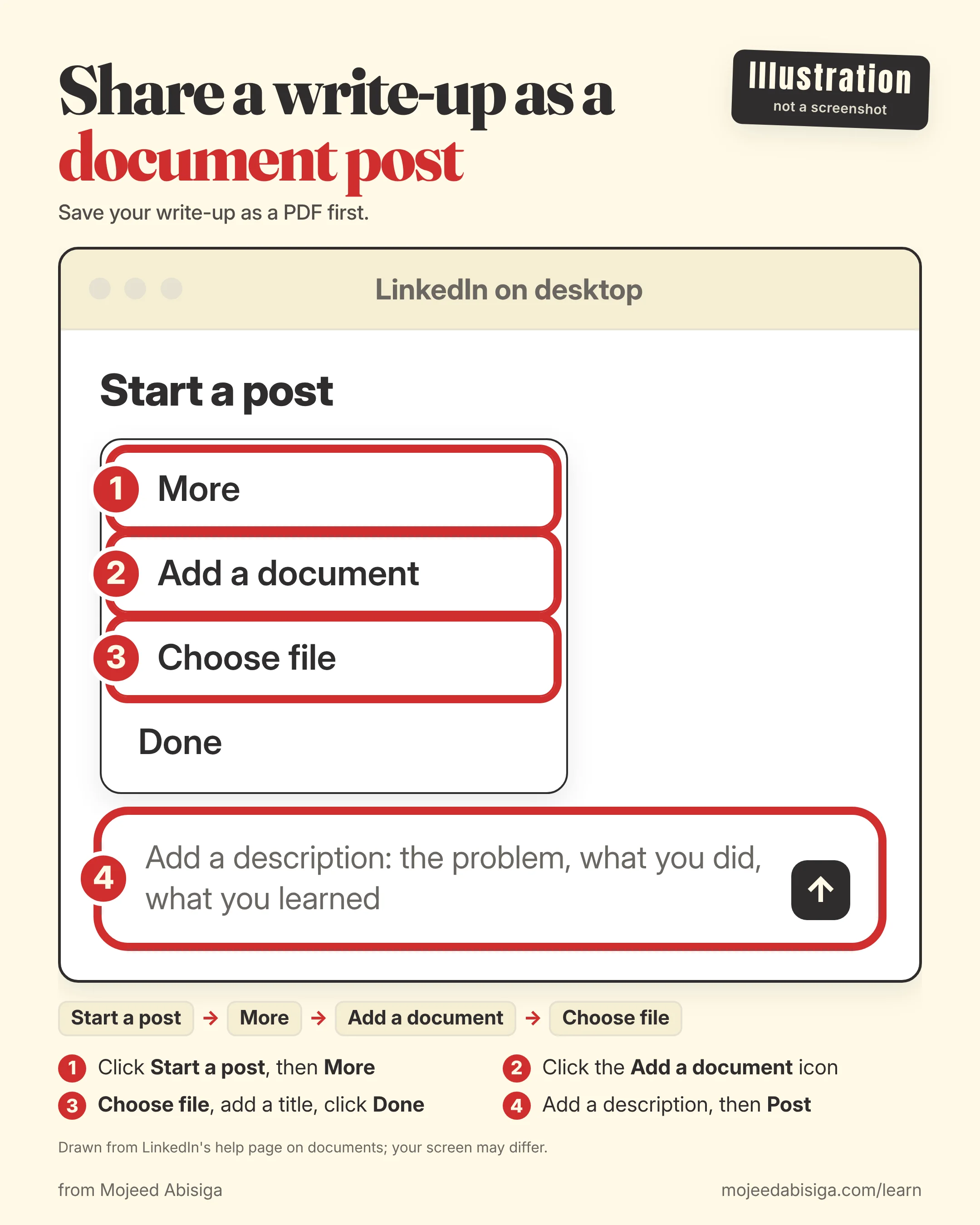
A document post works well for a one-page write-up. People who can see the post can download it as a PDF.
On desktop, click Start a post, then More, then the Add a document icon. Click Choose file, add a title, and click Done. Add a description and click Post.
LinkedIn advises converting the file to PDF where possible. Document posts accept PDF, Word and PowerPoint files up to 100MB and 300 pages.
One thing to know: after you post, you can edit the description but not the document. Check it before you share.
Keep your badges next to your proof
Your certificates still belong on your profile. Put them next to the work.
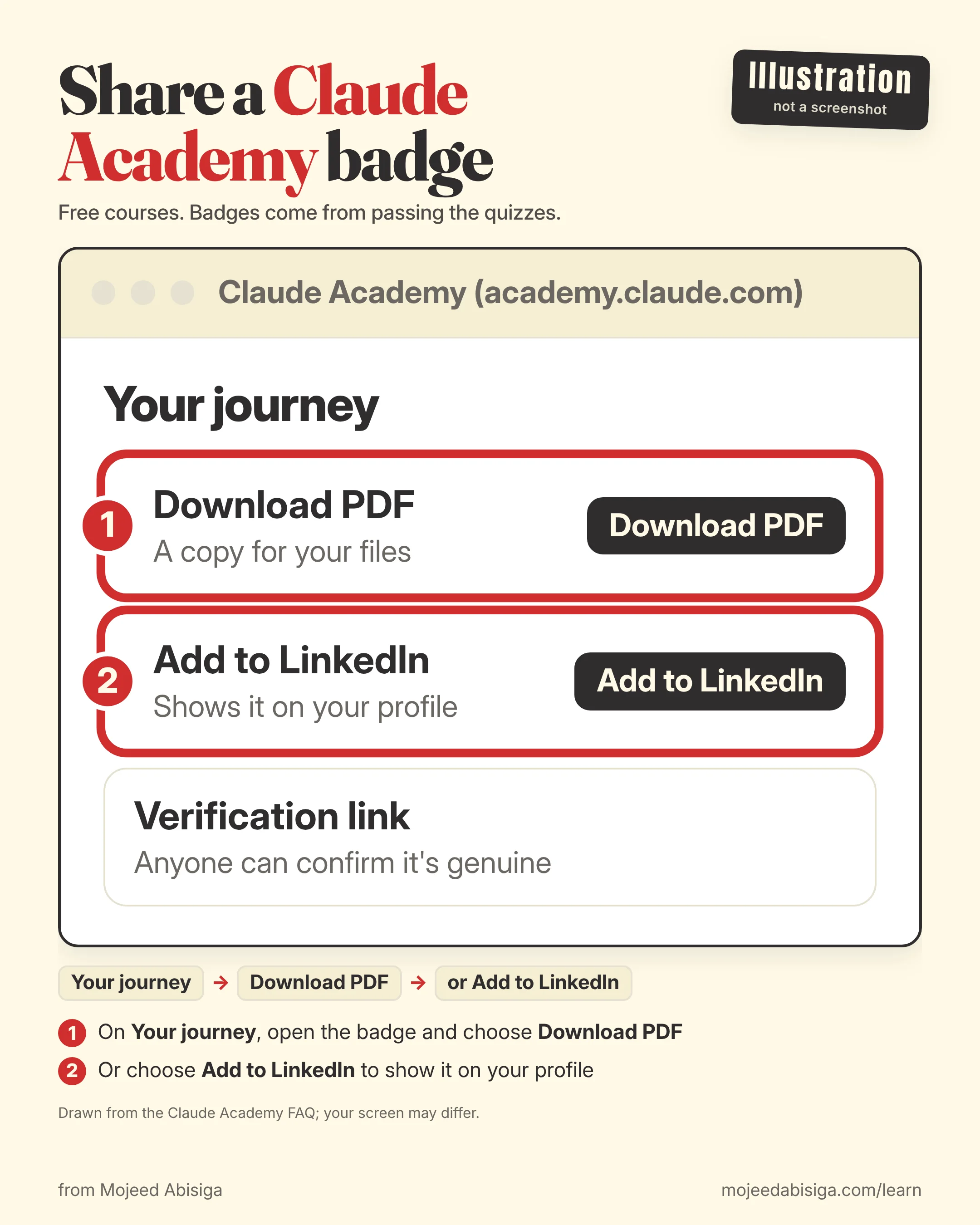
If you have a Claude Academy badge, go to Your journey, open the badge, and choose Download PDF or Add to LinkedIn. Each badge also has a public verification link anyone can use to confirm it's genuine.
If you took courses on the old site, anthropic.skilljar.com, it closes in early December. Import your history into Claude Academy, using a Claude account with the same email, and save your certificate PDFs before then.
Build a small portfolio
After two or three projects, put them in one place: a simple page, or one post that links to each.
Each one gets a title, one line on the problem, and a link.
Here are my projects and write-ups: [paste titles and one line each].
Here's the job or client I want: [describe it].

Suggest the order to show them in, a one-line headline for each, and a short intro (three sentences, in plain words) about what I can do.
Tell me which project is weakest for this goal, and what I could build next to fill the gap.The line never to cross
Some people chase the certificate and skip the learning.
Don't.
When you take a course, take the quizzes yourself. A quiz is there to show you what you haven't learned yet. That's useful information.
Claude Academy lets you retake its quizzes as often as you need, unless you hit its daily limit on completion badges. Then the quiz opens again at midnight US Pacific time. So there's no reason to rush. Fail, learn, try again.
Use AI to explain a concept you're stuck on. Ask it for practice questions. Ask it to quiz you on yesterday's lesson.
I'm learning [topic] from a course. Here are my notes from this module: [paste them].

Explain the two ideas I seem least sure about, in plain words, with an everyday example.
Then ask me five practice questions of your own, one at a time.
Wait for my answer each time, tell me if I'm right, and explain why.
A certificate you earned is a small piece of proof by itself. One you didn't earn falls apart the first time someone asks you a question.
And they will ask.
What to do today
Keep your certificates. They show you were willing to learn.
Then pick one problem from your work this week.
Run the first prompt. Choose one project you can finish in two weekends.
Do the work yourself, with AI as your coach. Write one page about it. Share it.
That's your first piece of proof. The second one comes faster.
I teach people to use AI at work, and this is the advice I'd give anyone starting out.
NewsletterRight tool, right job.Stop looking for one AI that does everything. Five everyday jobs, and where to start for each:Mojeed