Newsletter · linkedin
Bring the point.
Using AI to write your LinkedIn posts? What it can't do for you, and what it can:

You asked AI for a LinkedIn post.
It gave you one in ten seconds.
Neat opening. Three tidy points. A question at the end.
You posted it. A few likes. Then nothing.
So you tried again. Same result.
Here's the honest reason: the post had no point that was yours.
AI can write. It can't decide what you know, what you believe, or who you're talking to.
That part is your job. And it's the part that makes people stop scrolling.
I teach people to use AI at work, and my mission is to make data and AI easy for everyone. This issue is the plain version of how to use AI on LinkedIn without sounding like everyone else.
Inside:
- What LinkedIn itself says about AI-written posts
- Give before you take
- Break your own patterns
- Fix your visuals
- Steady beats a burst
- Decide who you want reading
- Prompts that keep your voice
Get the next one in your inbox
One practical guide at a time: the exact steps, the prompts to copy and the mistakes to skip.
Free. Delivered by Substack, one click to unsubscribe. Form not showing? Subscribe on Substack.
What LinkedIn says about AI posts
Start with the rules of the room.
LinkedIn has a help page called Best practices for content created with the help of AI.
It says LinkedIn does not want "AI slop".
Its definition: low-effort, likely AI-generated content that sounds polished but lacks a clear point of view, unique perspective or substance.
Read that again. Sounds polished. That's exactly what a quick AI draft does well.
The same page says LinkedIn judges whether content adds value, not how it was made.
AI-assisted posts are welcome when they reflect a real person's perspective.
Generic or repetitive posts are less likely to be widely distributed.
And readers can now flag a post through its More menu with "Seems like AI slop". If a post gets enough of that feedback, its author sees a tip in Post analytics. LinkedIn says that's a tip, not a takedown.
LinkedIn also asks you to review, edit and approve anything AI helped with. You're responsible for everything you post. If you relied heavily on AI and it isn't obvious, it suggests saying so.
| What a quick AI draft gives you | What LinkedIn says it wants |
|---|---|
| Polished sentences | A clear point of view |
| Safe, general advice | A unique perspective |
| The same shape as every other post | Substance, from a real person |
| Words nobody checked | Content you reviewed, edited and approved |
Nobody is waiting for your post
This one stings a little.
Nobody opens LinkedIn hoping to hear from you.
They open it for themselves: to learn something, solve something, or feel less alone with a problem at work.
LinkedIn's own words back this up. In its page on how the feed decides what to show, one of the content signals it lists is whether a post provides knowledge or advice.
Others include what the post is about, how recent it is, and how constructive the conversation under it is.
So the question for every post is simple.
What does the reader walk away with?
A method they can use tomorrow. A mistake they can now avoid. A number explained. A clear opinion they can argue with.
If the honest answer is "they learn that I'm busy", rewrite it.
Here's a prompt that makes AI ask you that question before it writes anything.
I want to write a LinkedIn post about this:
[paste your rough idea, a few lines is fine]

Don't write the post yet.

First, ask me five short questions, one at a time, to find out:
1. who exactly this is for
2. what they should be able to do or understand after reading
3. the one example or moment from my own work that proves it
4. what most people get wrong about this
5. what I actually believe that others might disagree with

When I've answered all five, tell me in one sentence what the reader gets from this post. If you can't, tell me the idea isn't ready.
The last line matters. A good assistant should be able to tell you "not yet".
Know someone whose posts read like a press release? Send them this issue.
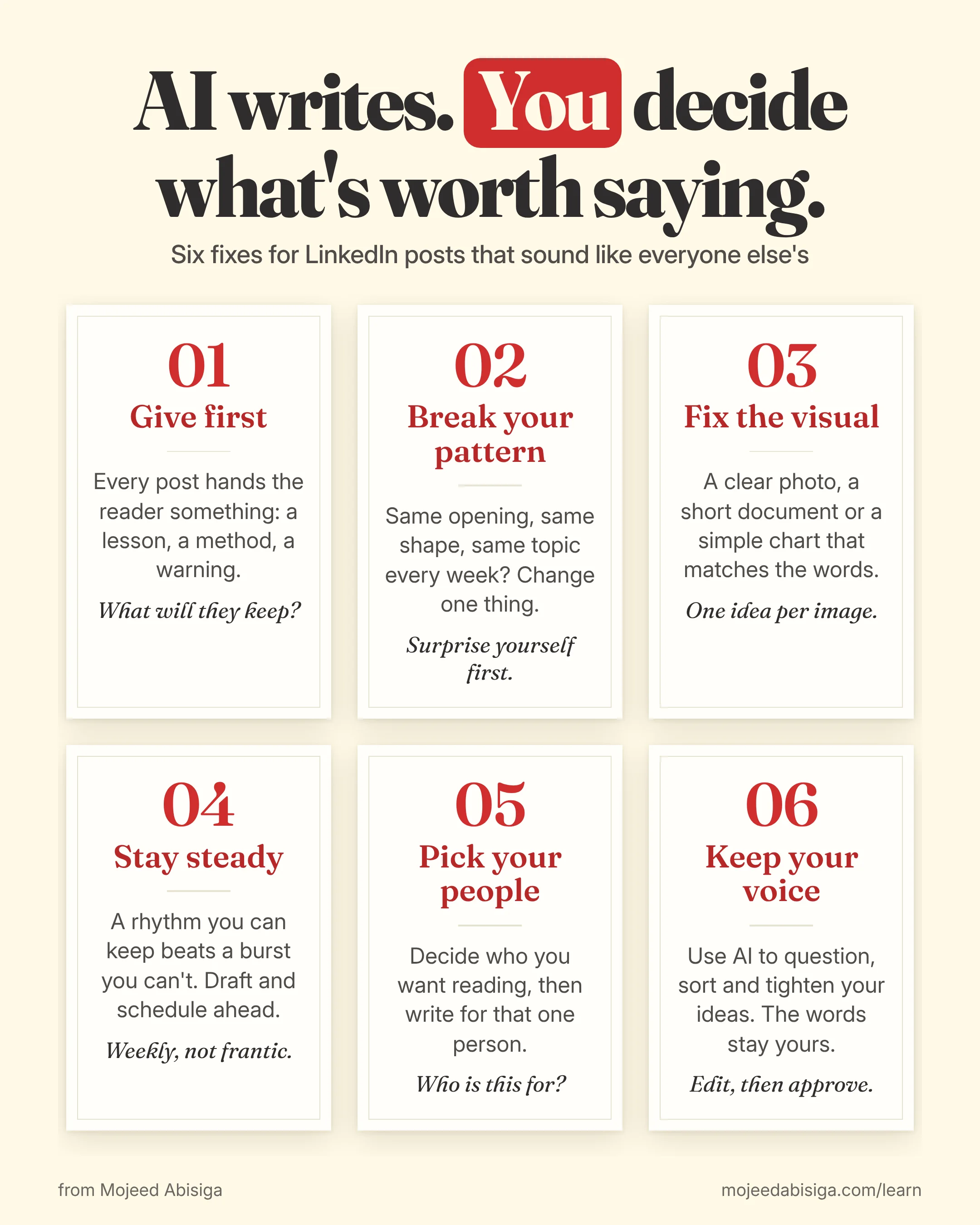
Spot your own habits
Look at your last ten posts.
Same opening line style? Same length? Same three-point list? Same topic, every week?
Your readers notice before you do.
LinkedIn noticed too. When it announced changes to the feed in March 2026, it said it is showing less engagement bait and recycled content.
The examples it gave: "comment to agree" prompts, and videos that don't match the text.
And remember the AI page: generic or repetitive content is less likely to be widely distributed.
AI makes repetition worse, because it reaches for the same shapes every time. Ask it for "a LinkedIn post" and you get the average LinkedIn post.
So use AI the other way round: to spot your habits, not to repeat them.
Below are my last ten LinkedIn posts, separated by ---.

[paste them]

Act as a blunt editor. Tell me:
1. the openings I keep reusing
2. the structures I keep reusing (lists, questions at the end, and so on)
3. the topics I keep circling back to
4. phrases that sound like any other post on LinkedIn
5. the one post that sounds most like me, and why

Then suggest three different ways I could shape my next post. Don't write it.
Three ways to change a habit
- Change the shape. If you always write lists, tell one short story. If you always tell stories, write a checklist.
- Change the angle. Write about what went wrong, not what went right. Or argue with an idea everyone in your field repeats.
- Change the format. If you always post text, try a document or a poll. More on that next.
Your visuals need work
People see the image before they read a word.
A blurry photo, a crowded slide or a stock picture that has nothing to do with the text tells them to keep scrolling.
LinkedIn gives you more formats than most people use. From the composer you can add a photo or video, an event or a celebration. Under the Plus icon you can create a poll, add a document, share that you're hiring, or add Services.
Its posting help page lists these.
Document posts are worth a look. LinkedIn's documents page says they take PPT, PPTX, DOC, DOCX and PDF files, up to 100MB and 300 pages.
Two details to know before you upload:
- after posting, you can edit the description but not the document itself
- people who can see the post can download it as a PDF
LinkedIn advises converting files to PDF where possible.
And mind the match. LinkedIn named videos that don't match the text as one of the things it is showing less of. Your visual should say the same thing as your words, only faster.
AI is useful here, as a planner. Let it plan the pages; you check every word on them.
I want to turn this idea into a short LinkedIn document post (a PDF of slides):
[paste your idea and the key points]

Plan it as 6 to 8 slides.
For each slide give me:
- a headline of at most 8 words
- one or two short lines under it
- what simple visual would help (a chart, an icon, a before/after), or "none"

Rules: one idea per slide. No slide may say anything I haven't told you. Flag any point where you need a fact or a number from me.Want the full method for making the visual itself? The guides on infographics with AI and slides with AI walk through it.
GuideInfographics that stay sharp.Clear, editable one-page visuals with AI, and a template your team can reuse:Steady beats a burst
Here's a pattern almost everyone falls into.
You get inspired. You post every day for a week. Then work gets busy and you vanish for a month.
AI makes the burst easier, because drafts cost nothing. That's the trap.
LinkedIn says it may limit the visibility of posts when it detects excessive posting that looks like inauthentic activity or an automation tool, and it may cap posts per time period.
It also says it takes action against comment automation, engagement pods and unauthorised third-party tools that create inauthentic engagement.
So a flood of AI drafts works against you.
What works for you is a rhythm you can keep: one you'd still manage in your busiest month.
LinkedIn has two simple tools for that.
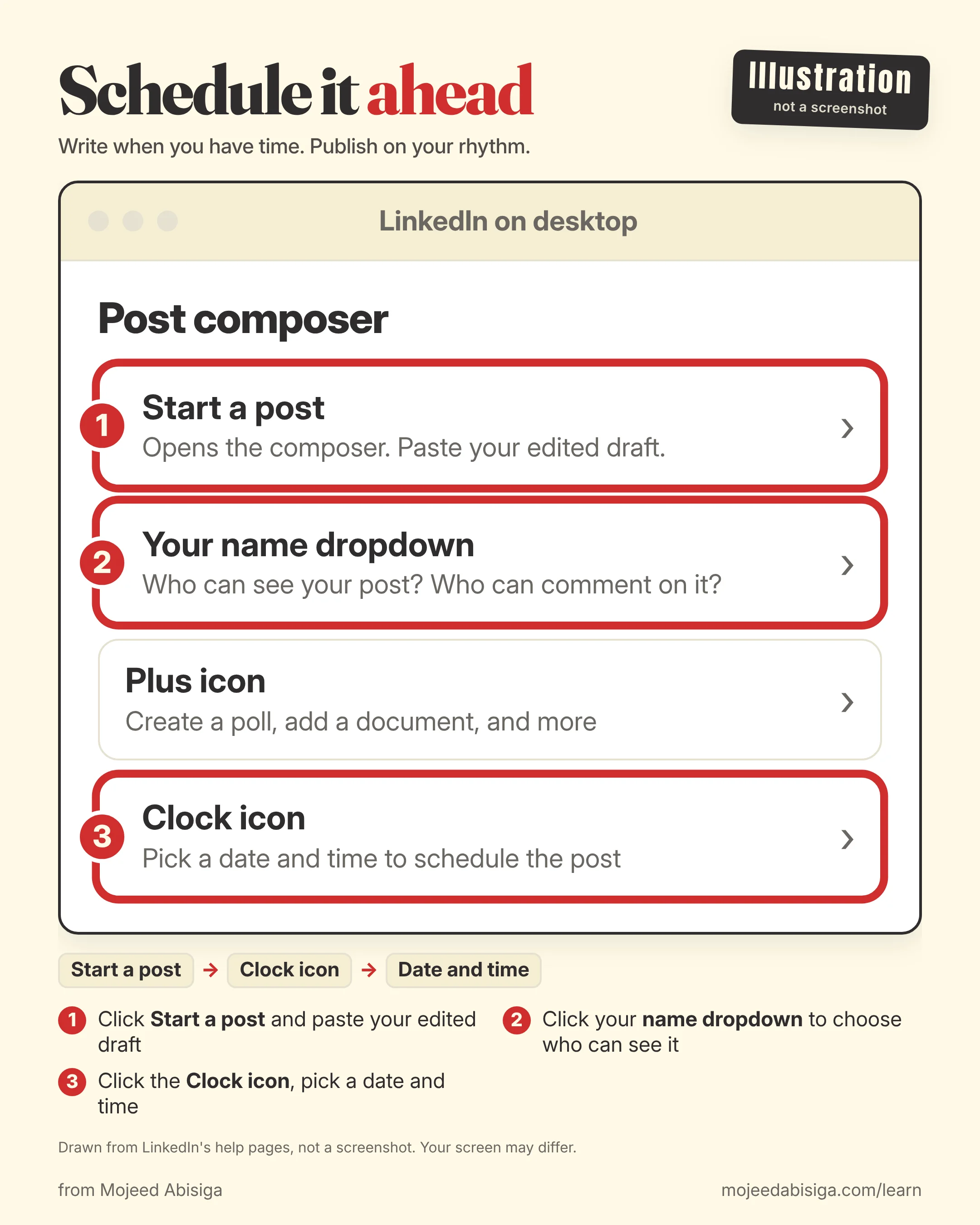
Drafts. You can save a post as a draft and keep editing it later, even from another device.
Scheduling. On desktop, click Start a post, write or paste your edited draft, then click the Clock icon in the composer and pick a date and time. You manage scheduled posts from the post composer.
| Burst | Steady rhythm | |
|---|---|---|
| How it feels | Exciting for a week | Boring, then normal |
| Quality | Drops as you rush | You have time to edit |
| Risk | Looks like excessive posting | A pace you choose |
| When work gets busy | You disappear | Scheduled posts keep going |
Use AI to fill a short list of ideas, then write one post at a time, properly.
Here's what I do at work and what I know well:
[a few lines about your role, your field and what people ask you about]

Give me 8 post ideas I could write over the next month.
For each one:
- the one thing the reader would take away
- which of my experiences it should draw on (ask me if you're not sure)
- a suggested format: text, story, document or poll

Mix the formats. Don't repeat an angle. Don't write the posts.
Know a colleague who posts in bursts and then goes quiet? This section is for them.
Decide who you want reading
"More followers" isn't an audience.
A small group of people in the exact role you want to reach can matter more than a crowd who'll never need you.
LinkedIn's feed thinks in these terms too. It says it looks at three main kinds of signals: Identity (profile details such as location, workplace and skills), Content, and Activity.
Its March 2026 update says ranking now uses signals you choose to share (industry, skills, experience, geography) alongside how you engage over time.
LinkedIn's engineering team adds that, for each post, its model reads the author's name, headline, company and industry along with the post text. It also says the new system surfaces posts from authors people don't follow.
In plain words: your profile, your words and the people you talk to all tell LinkedIn who your posts are for.
So decide it on purpose.
- Your headline should name who you help, in words that person would use.
- Your posts should talk about that person's problems, in their language.
- Your comments on other people's posts count as activity too. Spend them where your audience already is.
LinkedIn also lets you choose Follow or Connect as the main button on your profile. Choose the one that fits what you want from people who find you.
Help me decide who my LinkedIn posts are for.

About me: [your role, field and what you're good at]
What I want from LinkedIn: [for example: clients, a new job, speaking invitations, peers to learn from]

Ask me questions until you can describe my ideal reader in five lines:
their job, their biggest work problem, what they already know, what they'd never read, and the words they use for their problem.

Then rewrite my current headline for that reader:
[paste your headline]
Give me three options of at most 20 words each.
Once you've chosen, check whether it's working. LinkedIn's help page says your post and audience analytics are in the Analytics section of your profile, or behind the Post impressions count on the left of your feed.
NewsletterProof gets you hired.Your AI certificates are a good start. Here's how to build the proof that comes next:Prompts that keep your voice
This is where most AI posts go wrong.
People type "write me a LinkedIn post about X" and accept what comes back.
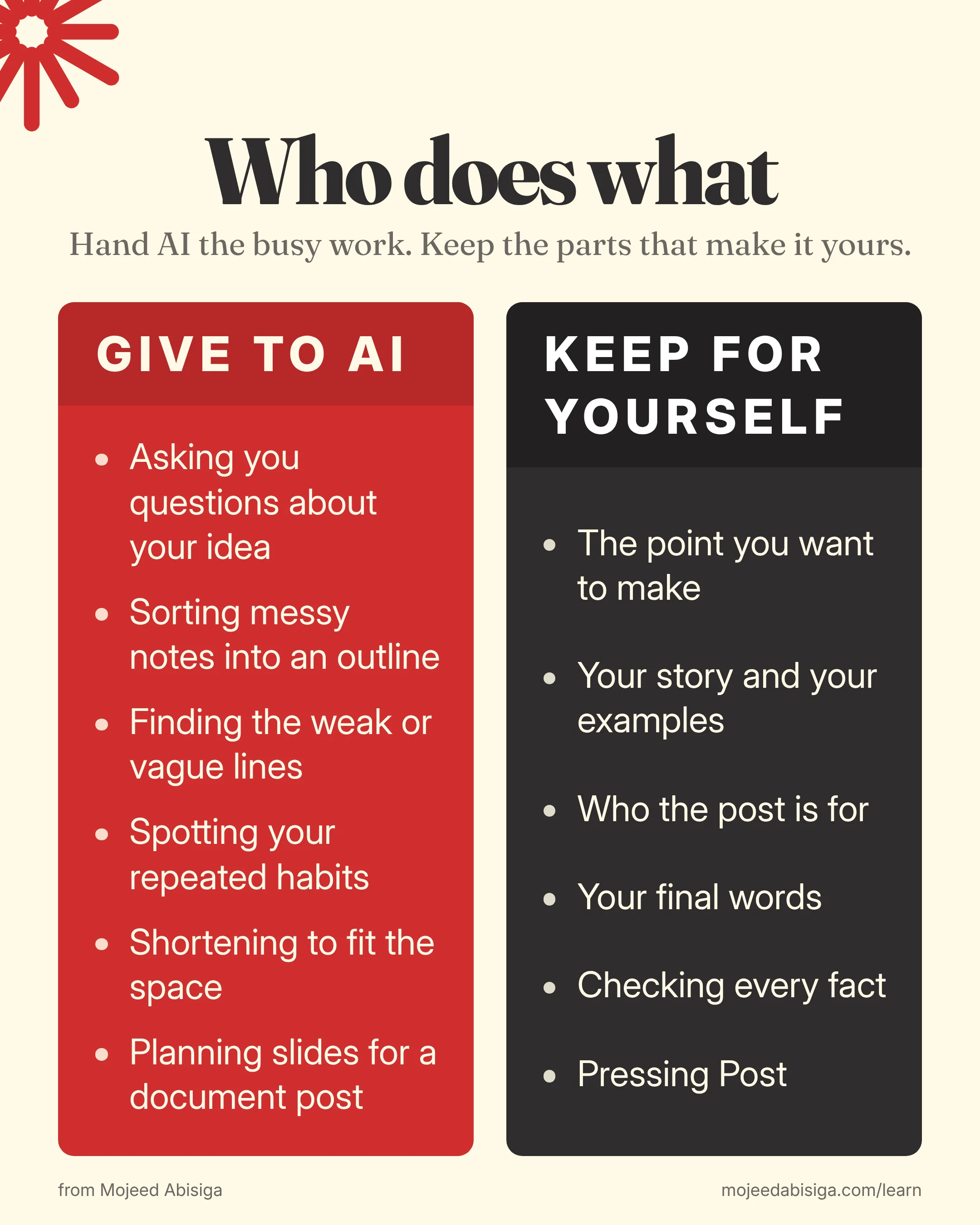
Do it the other way round. You write first, even badly. AI edits.
That keeps your ideas, your examples and your rhythm, and uses AI for what it's good at: questioning, sorting and tightening.
1. Capture your voice once
Below are 3 to 5 pieces of writing that sound like me: posts, emails or messages I'm happy with.

[paste them]

Describe my writing voice in a short list I can reuse:
- sentence length and rhythm
- words and phrases I use often
- words I never use
- how I open and how I close
- how formal or casual I am
- what I do with examples and numbers

Keep it under 150 words. Use only what you can see in the samples.
Save the result. Paste it at the top of every drafting chat. If you use Claude, you can put them in a project's instructions instead: those apply to every chat inside that project. This issue shows how to set one up.
2. Turn your rough notes into a draft
Here are my voice notes:
[paste them]

Here's my rough draft of a LinkedIn post. It's messy on purpose:
[paste your notes or draft]

Edit it into a post of at most 1,300 characters.
Rules:
- keep my ideas, my examples and my opinions; add none of your own
- keep my words wherever they work
- short paragraphs, one or two lines each
- no hashtags, no emojis, no question at the end asking people to comment
- if something is unclear or unsupported, mark it with [?] and don't guess
The 1,300 is a choice, not a rule: LinkedIn allows up to 3,000 characters. Shorter usually forces you to pick one point. If you need more than 3,000, LinkedIn suggests writing an article instead.
3. Run the slop check
Read this LinkedIn post as a tired professional scrolling on their phone:
[paste the post]

Tell me honestly:
1. Which lines could have been written by anyone? Quote them.
2. Where is the point of view? If there isn't a clear one, say so.
3. What does the reader walk away with, in one sentence?
4. Which line would make them stop scrolling, if any?
5. Any claim or number I should double-check before posting?

Don't rewrite the post. Just give me the notes.
Then fix it yourself. Read it out loud. If it doesn't sound like something you'd say to a colleague, it isn't done.
For a deeper look at writing prompts that work for any job, read one good prompt.
Get the next one in your inbox
One practical guide at a time: the exact steps, the prompts to copy and the mistakes to skip.
Free. Delivered by Substack, one click to unsubscribe. Form not showing? Subscribe on Substack.
What to do this week
Small steps. One post, done properly.
- Read LinkedIn's AI best practices page. It takes five minutes.
- Run the Audit your last ten posts prompt and note your top three habits.
- Run My voice notes once and save the result.
- Write your next post yourself, rough, then use Edit, don't invent and the Slop check.
- Check every fact and every word before you post.
- Pick a rhythm you can keep, and schedule your next post with the Clock icon.
- Write down, in one sentence, who you want reading.
AI can make a good post better.
It can't make an empty post worth reading.
Bring the point. Let AI help with the rest.
If this helped, send it to one person who's been posting a lot and getting little back.
Mojeed