Guides · Claude
Claude skills, from zero.
For anyone who pastes the same instructions into Claude every day: install your first skill safely and use it today.

Contents
You paste the same long instructions into Claude.
You explain the same format again.
You correct the same mistakes.
A skill ends that. You teach Claude a job once, and it does it your way from then on.
By the end of this guide you'll have:
- one skill installed and switched on
- a clear idea of when Claude uses it
- a short safety check you can run on any skill
You need: a Claude account and ten minutes.
Get the next one in your inbox
One practical guide at a time: the exact steps, the prompts to copy and the mistakes to skip.
Free. Delivered by Substack, one click to unsubscribe. Form not showing? Subscribe on Substack.
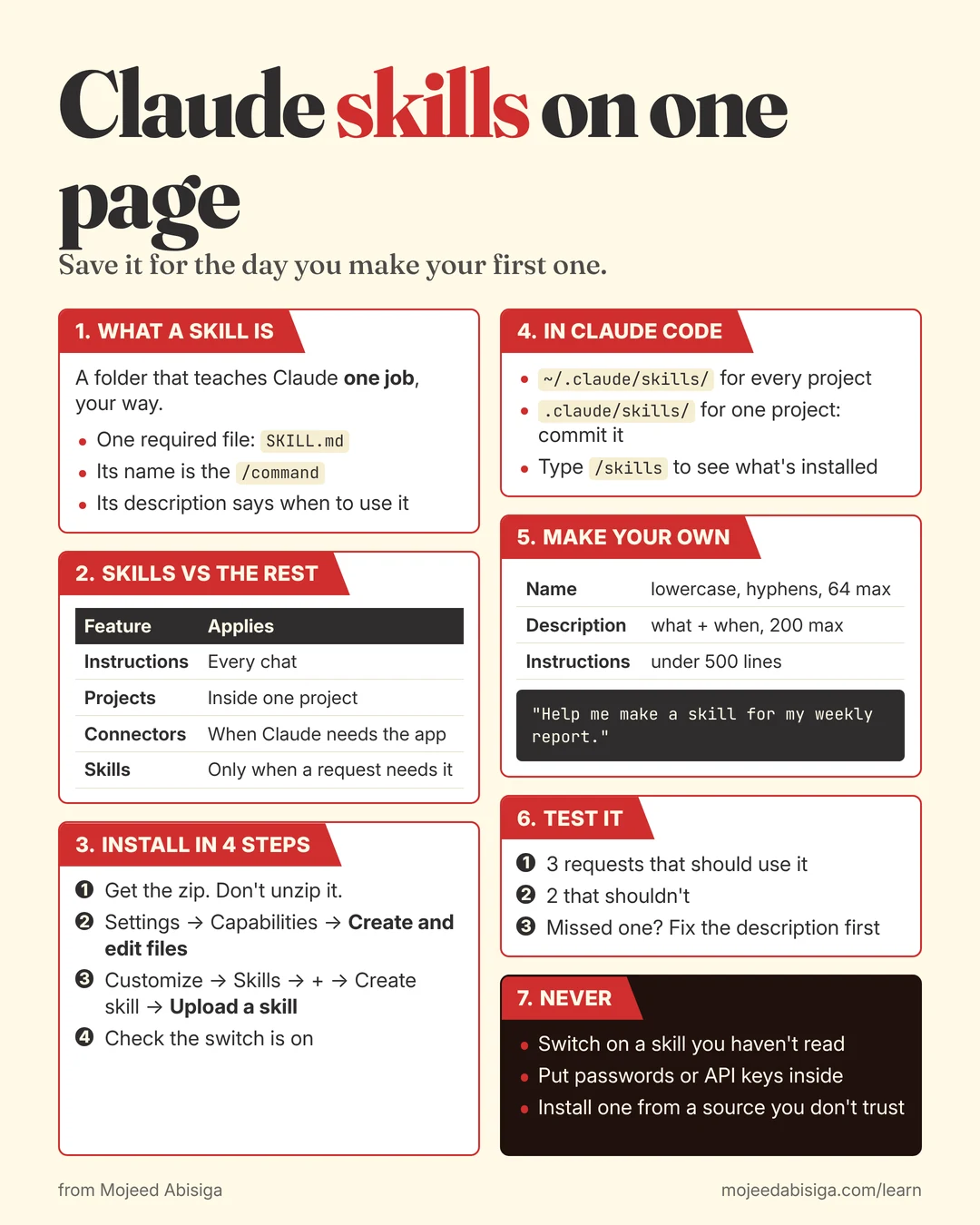
1. Know what a skill is
A skill is a small folder of instructions. Sometimes it also holds scripts and templates.
Every skill has one required file: SKILL.md.
Its first lines hold two things:
- a name, which is also the command you can type, such as
/learn-anything - a description of what the skill does and when to use it
Below that come the instructions: steps, rules, examples and checklists.
2. See how skills differ
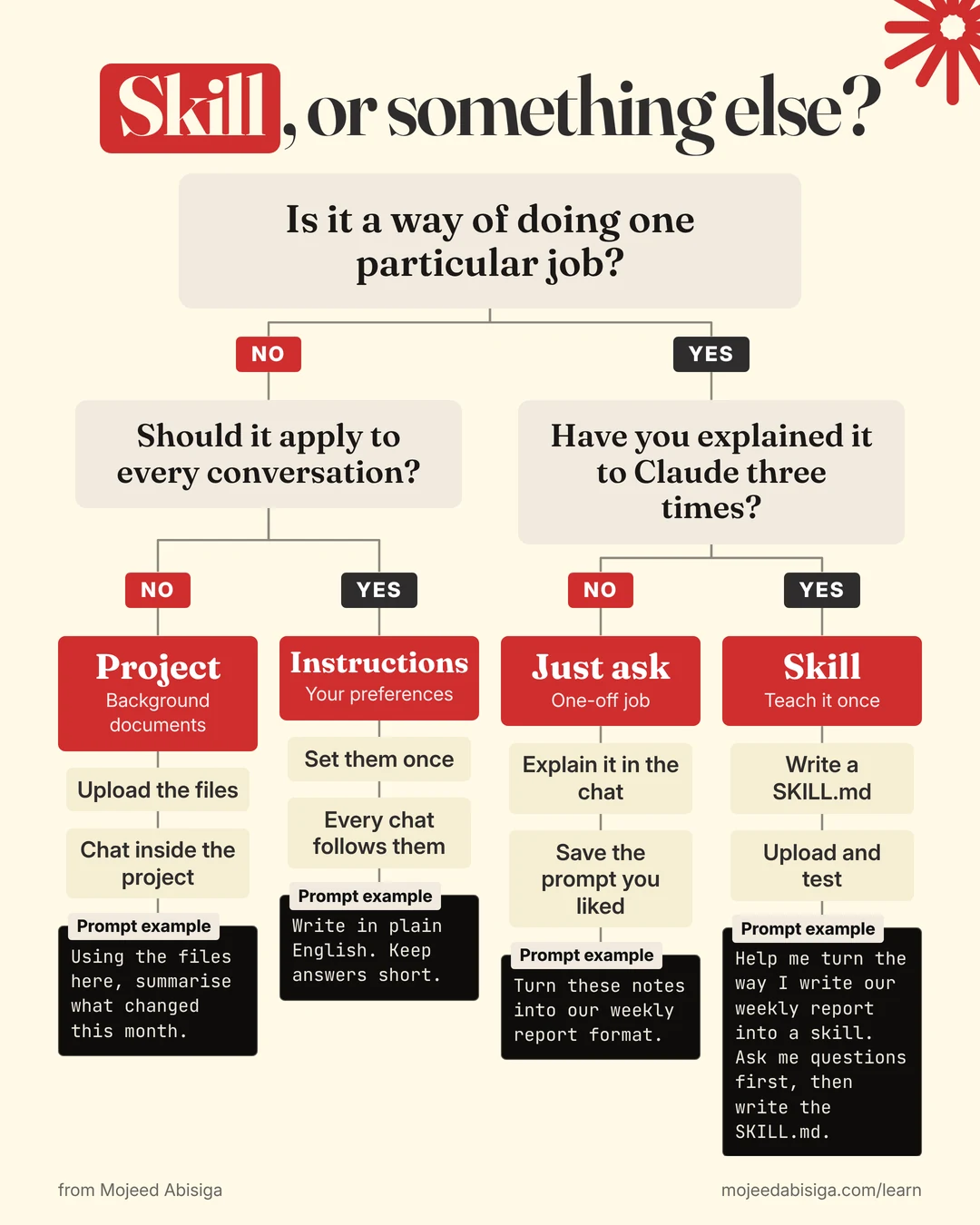
You already have other ways to shape Claude. Here's where a skill fits:
| Feature | What it gives Claude | When it applies |
|---|---|---|
| Custom instructions | Your general preferences | Every conversation |
| Projects | Background documents and knowledge | Chats inside that project |
| Connectors (MCP) | Access to other apps and data | When Claude needs that app |
| Skills | A way of doing one job | Only when a request needs it, in any chat |
They work well together.
A connector lets Claude reach your project tracker. A skill teaches it how your team writes tickets.
3. Check where skills work
Skills work in more places than most people think:
- Claude on the web and in the desktop app, on every plan from Free to Enterprise, once code execution is on.
- Claude Code, from folders on your computer.
- Claude for Excel, PowerPoint, Word and Outlook.
- Cowork, which uses the skills switched on for your account.
- The Claude API, in beta, where skills run in a sandbox with no internet access.
Skills also follow an open standard, the Agent Skills specification. A skill you write isn't locked to one product.
4. Turn skills on
Open Settings → Capabilities.
Turn on Create and edit files. In the older Settings layout, it's called Code execution and file creation.
5. Install a skill
There are two ways to get one.
Ready-made: open Customize → Skills, click +, then Browse skills. You'll find skills from partners such as Notion, Figma and Atlassian, built to work with their connectors.
From a zip (one you made, or one from a source you trust):
- Get the skill's zip file. Don't unzip it.
- Open Customize → Skills, click +, then Create skill → Upload a skill.
- Choose the zip.
- Check that the skill's switch is on.
That's it. Ask for something the skill covers.
6. Use it
You rarely need to do anything special.
Claude reads the descriptions of your skills and uses one by itself when your request matches.
To be sure, name it:
Use my weekly-report skill on these notes.In Claude Code and in the Microsoft 365 add-ins, you can also type / and pick a skill from the list.
7. Add skills to Claude Code
Claude Code reads skills from folders on your computer.
- For every project: unzip the skill into
~/.claude/skills/, so you end up with~/.claude/skills/learn-anything/SKILL.md. - For one project (and everyone who works on it): unzip it into the project's
.claude/skills/folder and commit it.
Run a skill by typing a slash and its name, or just ask. /skills lists what's installed.
Skills you switch on in your Claude account also sync to Claude Code when you sign in with the same account.
Find skills worth installing
There are three good places to start.
1. Claude's own directory. In Customize → Skills, click +, then Browse skills. You'll find skills from partners such as Notion, Figma and Atlassian, built to work with their connectors.
2. Anthropic's examples. At github.com/anthropics/skills. Good to learn from, and to adapt to the way you work.
3. Your own. The best skills capture the tasks you repeat every week, the way your organisation does them. Nobody else can write those for you.
NewsletterTen skills worth writing.The ten Claude skills I wrote for the people I teach: what each one does, why it works, and a request to try:Make your own
Once you've explained the same thing to Claude three times, it's worth a skill.
The short version:
- Make a folder named after the job, like
weekly-report. - Write SKILL.md: a name and a description between two lines of dashes, then numbered steps, the mistakes to avoid and one short example.
- Zip the folder, not the files inside it.
- Upload it in Customize → Skills, and switch it on.
- Test it with three requests that should use it and two that shouldn't.
The full walkthrough: make your first skill
8. Stay safe
A skill can contain code that runs when Claude uses it.
So treat an unknown skill like an unknown app.
The two main risks:
- Prompt injection: hidden instructions that steer Claude into something you didn't ask for.
- Data leaks: a script that sends your information somewhere.
The fix is the same for both: check before you trust. On Enterprise plans, owners can also turn on skill scanning, which checks uploaded skills for malicious content.
Before you finish
- Create and edit files is on
- One skill is installed and its switch is on
- I read every file of that skill before switching it on
- I asked for something it covers, and Claude used it
Questions
Do many skills slow Claude down?
No. Skills load in layers. Claude always sees just the name and description of each skill you've switched on, a line or two each. It reads the instructions only when a request matches, and extra files only if needed.
When is a skill worth making?
Once you've explained the same thing to Claude three times.
Where can I learn from good examples?
Anthropic's examples on GitHub, at github.com/anthropics/skills, are good to learn from and adapt.
NewsletterMake your first skill.Turn the instructions you paste into Claude every day into a skill that does the job your way: