Guides · Claude
Skill, project, instructions or connector?
Claude gives you four ways to teach it how you work. Here's which one to use, and when:

Contents
You've told Claude how you like things done.
Then you told it again, in a new chat.
And again the next day.
The problem usually isn't Claude. It's that you put the instruction in the wrong place.
Claude gives you four ways to shape how it works. Each one applies at a different moment. Pick the right one and you explain things once.
By the end of this guide you'll know:
- what each of the four gives Claude
- when each one applies, and when it doesn't
- the two questions that pick the right one in ten seconds
1. The four, side by side
| Feature | What it gives Claude | When it applies |
|---|---|---|
| Custom instructions | Your general preferences | Every conversation |
| Projects | Background documents and knowledge | Chats inside that project |
| Connectors (MCP) | Access to other apps and data, such as your drive or calendar | When Claude needs that app |
| Skills | A way of doing one particular job | Only when a request needs it, in any chat |
The last column is the one that matters. It tells you when Claude will remember what you taught it.
2. Custom instructions: how you like things, everywhere
Custom instructions hold your general preferences.
They apply to every conversation, whatever you're working on.
Put here: the things that are true in every chat. How plain you want the language. How long answers should be. The words you never want to see.
Don't put here: the steps of one particular job. Those would follow you into every chat, even the ones that have nothing to do with that job.
Write in plain English. Keep answers short. Ask me before you assume anything about my work.3. Projects: the background for one piece of work
A project holds background documents and knowledge.
It applies only to the chats inside that project.
Put here: the files Claude should read for one client, one course or one big piece of work. Open a chat inside the project, and Claude has the background.
Don't put here: a way of doing a job you repeat everywhere. The project's chats would know it, and every other chat wouldn't.
Using the files here, summarise what changed this month.4. Connectors: reach into your other apps
Connectors give Claude access to other apps and data, such as your drive or calendar.
They apply when Claude needs that app.
Use them for: anything where the answer lives somewhere else. The latest version of a document. The meetings on your calendar. The tickets in your project tracker.
A connector gives Claude access. It doesn't teach Claude how you want a job done. That's the next one.
5. Skills: one job, done your way, in any chat
A skill is a way of doing one particular job.
It applies only when a request needs it, in any chat.
It's a small folder of instructions, and sometimes scripts and templates. Its first lines hold a name and a description. Claude reads the description to decide when to use it.
Use them for: the jobs you repeat. The weekly report. The meeting summary. The email in your team's format.
My rule: once you've explained the same thing to Claude three times, make it a skill.
Make your first skill, step by step
6. Use them together
They aren't rivals. They work best together.
A connector lets Claude reach your project tracker.
A skill teaches it how your team writes tickets.
Your custom instructions keep the tone plain. A project holds the background for the work you're tracking.
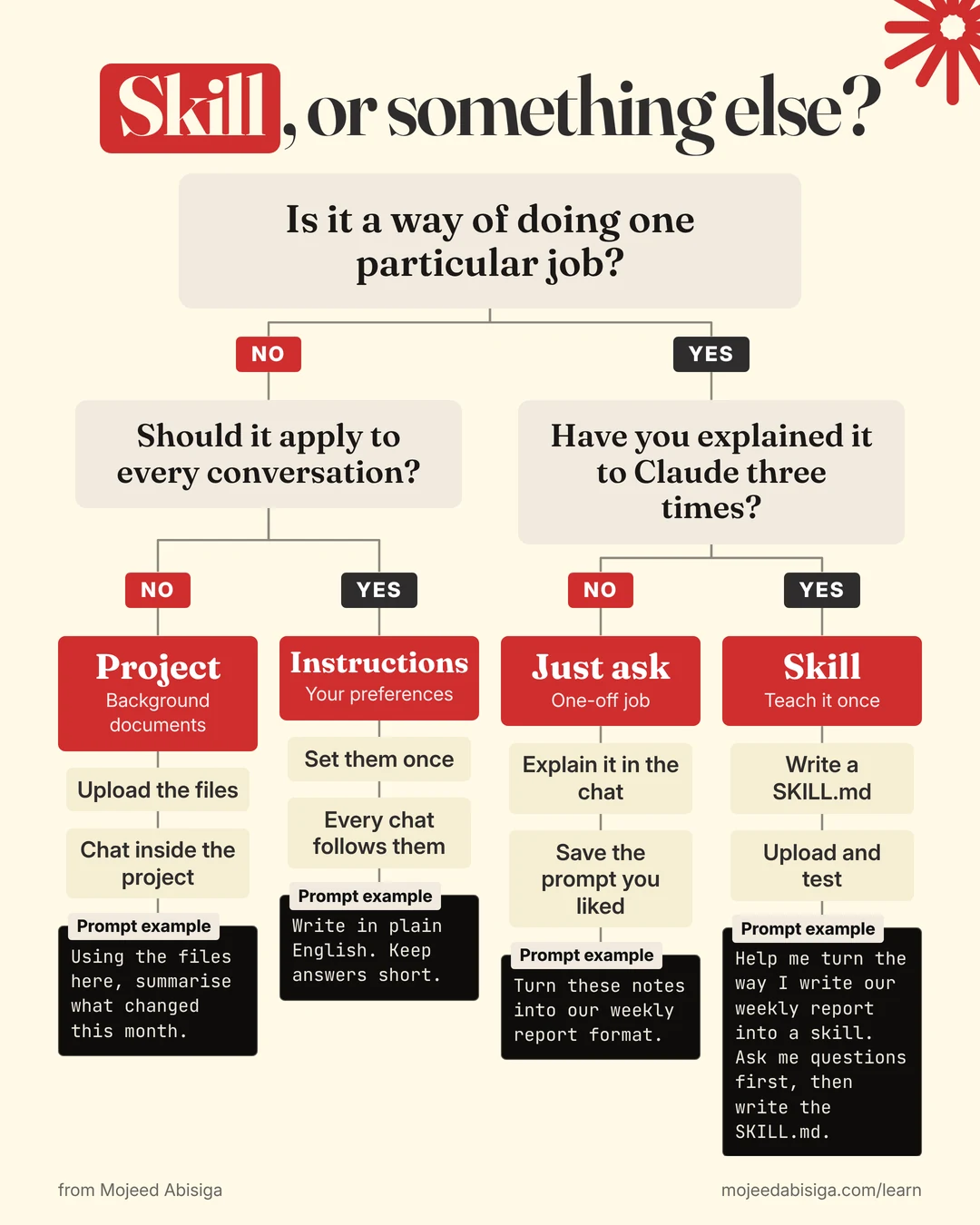
7. The two questions
Not sure? Ask these, in order.
Question 1: Is it a way of doing one particular job?
- No, and it should apply to every conversation? Custom instructions.
- No, and it's background for one piece of work? A project.
Question 2: Have you explained it to Claude three times?
- Not yet? Just ask in the chat. Save the prompt you liked.
- Yes? Make it a skill.
Need Claude to reach another app along the way? Add a connector.
Before you finish
- My general preferences are in custom instructions, and nothing job-specific is in there
- Each big piece of work has its own project with its files
- The apps Claude needs are connected
- The job I've explained three times is on my list for a skill
Questions
Can I use all four at once?
Yes. They apply at different moments, so they work together: preferences everywhere, background inside a project, other apps when needed, and a skill when a request needs that job.
Will lots of skills slow Claude down?
No. Claude sees just a line or two per skill until a request needs one.