Guides · Claude
Cowork, from zero.
You don't code? Good. Here's how to hand Claude real work, step by step:

Contents
You've used Claude to answer questions.
Maybe to rewrite an email. Maybe to explain something.
Then you hear that Claude can build a whole spreadsheet, or tidy a messy downloads folder, while you get on with something else.
That's Cowork.
And you don't need to write a single line of code to use it.
I teach people to use AI at work. So this guide is plain words and real steps. Nothing technical.
By the end of this guide you'll have:
- a clear picture of what Cowork is, and when to use it instead of chat
- the desktop app installed, with a safe folder set up for Claude
- one real task done, from a two-line request
- a better habit than long prompts: letting Claude interview you
- one plugin or connector added for your kind of work
- a short list of jobs to keep away from it
You need: a paid Claude plan (Pro or above) and a Mac, Windows or Linux computer.
Get the next one in your inbox
One practical guide at a time: the exact steps, the prompts to copy and the mistakes to skip.
Free. Delivered by Substack, one click to unsubscribe. Form not showing? Subscribe on Substack.
1. Know what Cowork is
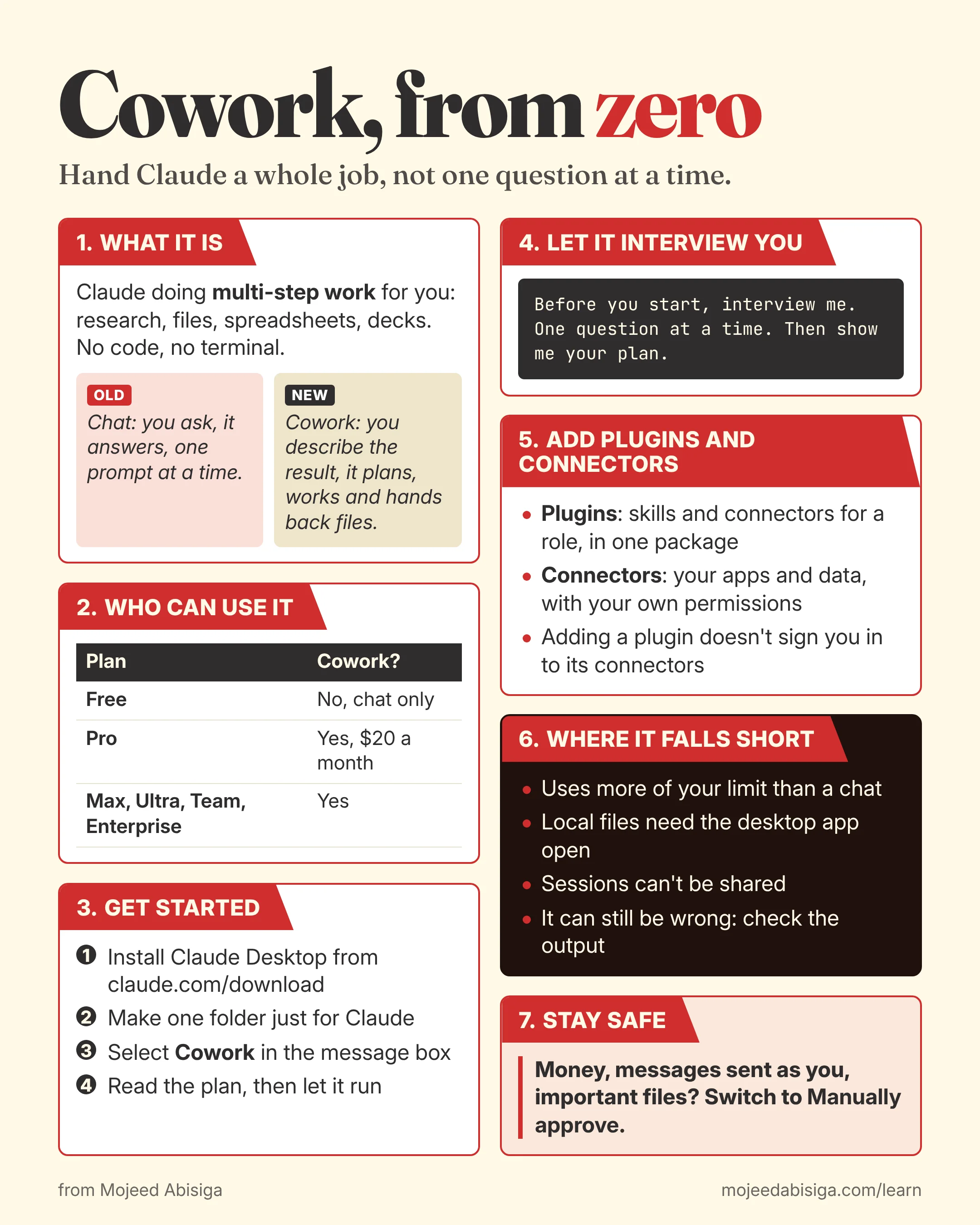
Cowork is Claude doing a whole job for you, not just answering one message.
Anthropic describes it as bringing Claude Code's agentic abilities to knowledge work beyond coding.
"Agentic" just means it can take steps on its own.
Claude Code is the version for software engineers. Cowork uses the same approach for everyone else: research, analysis, documents. And it needs no terminal.
Here's what happens when you give it a task:
- Claude reads your request and makes a plan.
- It breaks the work into smaller steps.
- It works through them in a private, temporary workspace on Anthropic's servers.
- It hands back finished files you can preview and download.
You can watch what it's planning and doing the whole time. Step in when it matters. Or step away.
That's the idea in one line: describe the outcome, step away, come back to finished work.
What can "finished work" look like? Excel spreadsheets with working formulas. PowerPoint decks. Formatted documents. Organised folders. A research write-up.
It reads most of the files you already use: Word, PDF, Excel, PowerPoint, CSV, plain text and common images.
2. See how it differs from chat
Here's the difference, side by side.
| Chat | Cowork | |
|---|---|---|
| You give it | a question or a prompt | an outcome you want |
| How it works | one reply at a time | plans, splits the job into steps, works through them |
| Your files | you upload them | on desktop, it reads and writes files in folders you connect |
| You get back | an answer, sometimes a file | finished files: spreadsheets, decks, documents, tidy folders |
| While it works | you wait for the reply | you can close your laptop and check back later |
| Plans | every plan, including Free | paid plans only |
| Usage | less | more, because each step uses some |
One thing is changing.
Anthropic is rolling out what it calls the "new Claude experience". In it, chat and Cowork merge into one conversation. There's no mode to pick. Claude decides what the job needs, and a quick question still gets a quick answer.
How do you know if you have it? Look at the message box. If it no longer shows "Chat" and "Cowork" options, you have it.
Everything in this guide still works. You just skip the step where you pick Cowork.
New to Claude itself? Start here
3. Check your plan and install the app
Cowork is on paid plans only: Pro, Max, Ultra, Team and Enterprise.
The Free plan gets chat, but not Cowork.
The cheapest way in is Pro: $20 a month, or $17 a month if you pay for a year up front ($200). Prices exclude tax. (Claude's pricing page.)
Where you can use it:
| Where | Who gets Cowork |
|---|---|
| Claude Desktop (Mac, Windows, Linux in beta) | all paid plans |
| Web and the Claude phone app | Pro, Max, Ultra and Team (beta on Team); Enterprise if an owner turns it on |
| Claude in Chrome side panel | all paid plans |
Start with the desktop app. It's the only place Claude can reach the files on your computer.
To install it:
- Go to claude.com/download.
- Pick your version: macOS, Windows, Windows (arm 64) or the Microsoft Store. Linux links to setup docs instead.
- Install it and sign in with your Claude account.
Check your computer first. You need macOS 13 (Ventura) or later, or Windows 10 or later. On Linux, Cowork also needs about 25 GB of free disk space and at least 8 GB of memory. (Install Claude Desktop.)
4. Give Claude a folder of its own
On desktop, Claude can read and write your files directly. No uploading, no downloading.
But only in folders you connect.
Anthropic's own advice: make a dedicated working folder for Claude, rather than giving it broad access. And keep backups of anything important.
So do this before your first task:
- Make a new folder. Call it something like "Claude Work".
- Copy in the files for one real job. Copies, not originals.
- When Claude asks which folder to use, point it here.
There's a safety net too. Claude has to ask your permission, with an "Allow" prompt, before it permanently deletes any file.
Set Cowork up properly, step by step
5. Run your first task
Here's how to start, in the desktop app:
- In the message box, select Cowork.
- Describe the task.
- Read Claude's plan, then let it run.
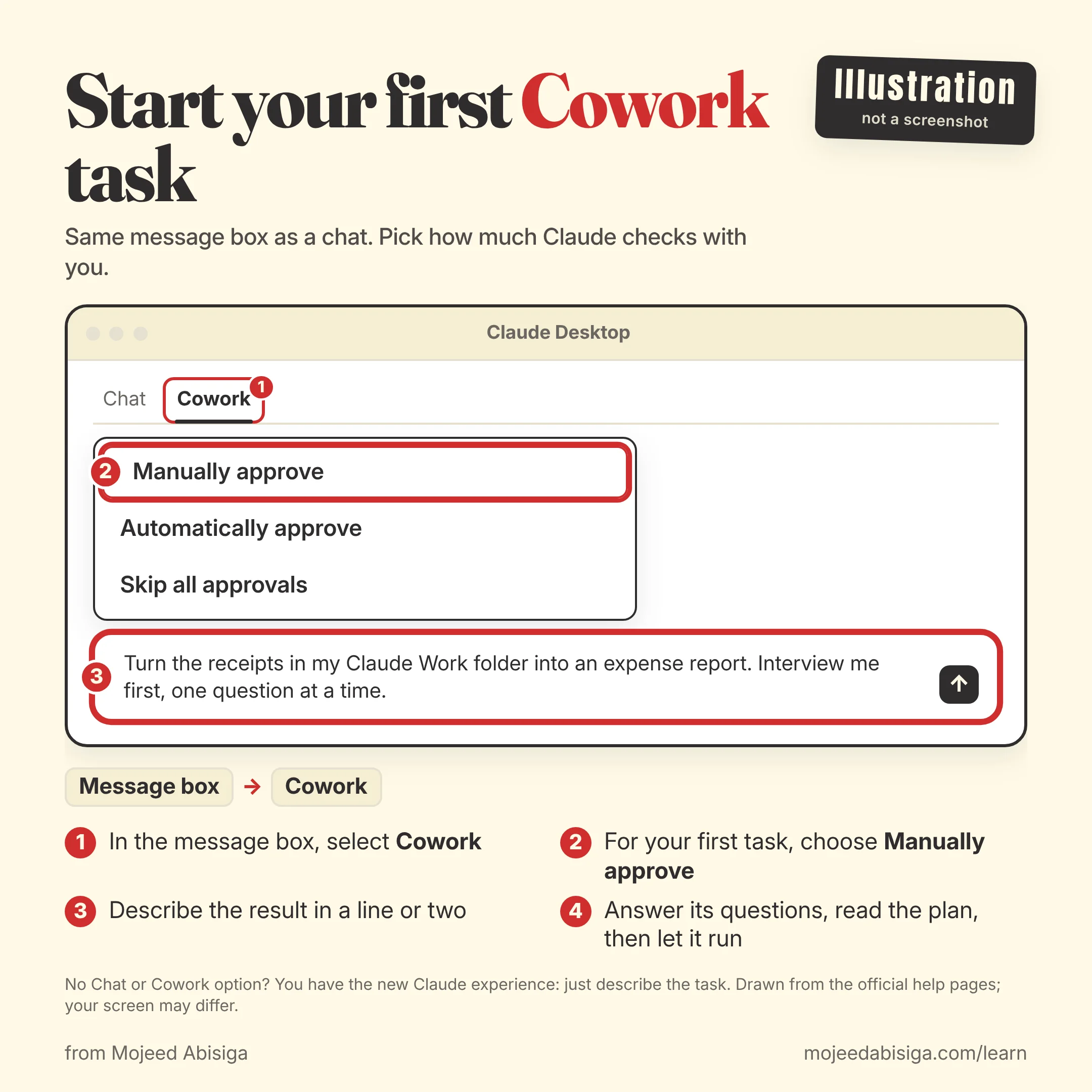
Before you send it, choose how much Claude checks with you. There's a setting for this in the message box, with three options:
| Option | What Claude does | Use it when |
|---|---|---|
| Manually approve | pauses and asks you to Allow or Deny actions | your first tasks, and anything sensitive |
| Automatically approve | keeps going, and screens each action for safety, blocking unsafe ones | everyday work you've done before |
| Skip all approvals | nothing checks its actions | almost never: only when you fully trust every file, app and connector involved |
"Automatically approve" is rolling out as the default on Pro, Max, Ultra and Team.
For your very first task, pick Manually approve. You'll see every step Claude wants to take. It's the fastest way to learn what it does.
Once the task is running, you don't have to sit and watch. Sessions keep going even if you close the app or your computer sleeps.
One exception: if the task uses files on your computer, keep the desktop app open so Claude can reach them.
6. Stop writing long prompts
Most people meet Cowork and do the same thing.
They spend twenty minutes writing a giant prompt. Every detail, every rule, every "make sure you".
Then they still forget the one thing that mattered.
There's a better way: write two lines, and let Claude interview you.
It suits how Cowork already works. Claude plans first, shows you its approach before it runs, and can stop to ask you questions during a task.
So you give it the outcome. It asks what it needs. You answer. It shows a plan. You say go.
You think about one question at a time, not everything at once. And Claude asks about the gaps you didn't know were there.
Here's the prompt. Replace the first line with your own task.
I want: [the finished thing, in one line].

Before you do anything, interview me.
Ask one question at a time and wait for my answer.
Ask about the goal, who it's for, which files to use, the format, and what "done" looks like.
Stop when you have enough, usually after five to eight questions.
Then sum up what you heard in five bullet points and show me your plan.
Don't start until I say go.
Three tips:
- Answer in a few words. It's a conversation, not an exam.
- Say "I don't know". Then ask Claude what it would suggest.
- Correct the summary. That's your last cheap moment to fix a misunderstanding.
Want this every time, without pasting it? Save a standing instruction.
In the desktop app, go to Settings → Cowork, click Edit next to Global instructions, paste the text below and click Save. In the new Claude experience, it lives in Settings → Your Claude, under Instructions for Claude.
For any task bigger than a quick question, ask me a few clarifying questions first, one at a time. Then show me your plan and wait for my go-ahead. For quick questions, just answer.7. Add plugins and connectors
Out of the box, Claude knows a lot. But it doesn't know your tools or how your kind of team works.
Two things fix that.
Connectors link Claude to your apps and data, so it can look things up and take actions there. A connector only sees what you can see: it uses your own permissions in that app.
Plugins are bundles made for a type of work. One plugin packs together skills (instructions for a job), connectors and helpers. Anthropic's first open-source plugins covered Productivity, Sales, Finance, Data, Legal, Marketing, Customer support and Product management, among others.
A plugin you add is saved to your account. So it works in chat too, not just Cowork.
Add a plugin
- Click Plugins in the left sidebar. (Older screens call it Customize, with a Plugins tab and a Discover section.)
- Browse the categories: topic, department, industry or everyday life.
- Open a plugin and read what it does. Then add it. (On older screens the button reads Add.)
Public plugins are labelled Verified or Community. Start with the ones that match your job.

To use it, type / or click + in the message box to see its skills.
Add a connector
In the message box, click +, then Connectors, then Manage connectors. Pick the app and sign in.
More on skills, the heart of every plugin
8. Hand it these jobs first
These are everyday jobs from Anthropic's own list of Cowork examples, written as prompts you can copy.
Each one is short on purpose. Add "Interview me first, one question at a time" to the end of any of them.
Tidy a messy folder
Organise the files in my Claude Work folder by type and date. Rename them in a YYYY-MM-DD pattern. Show me the new structure before you move anything, and don't delete anything.Turn receipts into an expense report
The receipts are in my Claude Work folder. Make an Excel expense report with date, supplier, amount and category for each one, a total, and working formulas. Flag any receipt you can't read.Pull actions out of meeting notes
Read the meeting notes in my Claude Work folder. Make one Word document with three parts: decisions made, actions with an owner, and open questions. Quote the line each action came from.Research while you're away
Research the main options for [what you're choosing] for a team like mine. Write a two-page comparison as a Word document, with a table and a list of the sources you used. I'll check back later.Rough notes into slides
Turn my notes in the Claude Work folder into a 10-slide PowerPoint deck I can present on Monday. One idea per slide, short bullet points, and speaker notes under each slide.When it's done, open the file. Read it properly. Then ask for changes in the same conversation, the way you'd give feedback to a colleague.
If you find yourself running the same task every week, type /schedule in a Cowork task, or click Scheduled in the left sidebar, and let it run on a timetable.
9. Know where it falls short
Cowork does a lot. It also has limits. Here's what to expect.
- It costs more of your usage. Multi-step tasks use more of your limit than a quick question, and every Claude app draws on the same allowance. Group related work into one task, start a new conversation for unrelated work, and check Settings → Usage.
- Local work needs the desktop app open. Tasks that use files on your computer, the browser or your screen stop reaching them when the app is closed.
- You can't share a session. You can share the files and artifacts it makes, but not the task itself.
- It can be wrong. Claude can still get facts wrong. Anthropic says not to treat it as your only source of truth. Check numbers, names and anything with your name on it.
- Some extras aren't everywhere. Computer use, where Claude clicks and types in your apps, works on Mac and Windows but not Linux. Cowork on Linux is still in beta.
- It isn't on Free. You need a paid plan.
And one risk to understand: prompt injection.
That's hidden instructions inside a web page, file or email that try to steer Claude. It needs two things at once: Claude reading content you don't control, and Claude being able to act. Anthropic has safeguards, but says the chance of an attack is still not zero.
So watch for anything unexpected: files or sites you never mentioned, or a task that keeps growing. If something feels off, stop it.
NewsletterHand Claude the mouse.Let Claude click, type and open apps for you, with the safety settings that matter, in six steps:10. A half-hour plan
Here's the whole thing as one half-hour plan.
| Minutes | Do this |
|---|---|
| 0 to 5 | Install Claude Desktop from claude.com/download and sign in. Check you're on Pro or above. |
| 5 to 10 | Make a "Claude Work" folder. Copy in the files for one real, low-risk job. |
| 10 to 15 | Save the standing instruction from step 6. |
| 15 to 25 | Select Cowork, choose Manually approve, and send a two-line request with "Interview me first". Answer the questions, read the plan, say go. |
| 25 to 30 | Open the result and check it. Then add one plugin that fits your job. |
Pick a job you'd happily do yourself if it went wrong. Receipts, meeting notes and a messy downloads folder are all good first tasks.
Save the client report for week two.
Before you finish
- I'm on a paid plan and Claude Desktop is installed
- I've made a folder just for Claude, with copies of my files
- I've run one task on Manually approve and read every step
- I've saved the "ask me first" standing instruction
- I've added one plugin, and connected its connectors myself
- I know to check the output before it goes anywhere
Questions
Do I need to know how to code?
No. Cowork needs no terminal. You describe what you want in plain words.
Is Cowork the same as Claude Code?
Same engine, different job. Claude Code is built for software engineering. Cowork is built for everything else: research, analysis and documents.
Does my laptop need to stay on?
Not for most tasks. They run on Anthropic's servers and keep going if you close your laptop. Tasks that use files on your computer, the browser or your screen need the desktop app open.
Can I use it on my phone?
Yes, on Pro, Max, Ultra and Team (beta on Team), through the web and the Claude phone app. You can check progress, answer Claude's questions and redirect the work from there. For files on your computer, the desktop app still needs to be open.
I don't see a Cowork option. What's wrong?
Nothing. You probably have the new Claude experience, where chat and Cowork are one conversation. Just describe the task. (Anthropic's explainer.)
Ready for the next step? Keep your tasks organised by job:
GuideGive every job a home.Cowork projects, from your first one to three you'll use every week: GuideStop running out of Claude.Hit the limit mid-task? How usage is counted, and twelve habits that make it last:Get the next one in your inbox
One practical guide at a time: the exact steps, the prompts to copy and the mistakes to skip.
Free. Delivered by Substack, one click to unsubscribe. Form not showing? Subscribe on Substack.
Start small, check the work, and let Claude ask the questions. See you in the next one.